
Our Verdict
Good TV for mixed usage. Performs best in a bright room with wide seating as the image remains accurate when viewed from an angle, but blacks appear gray in a dark room.
- Wide viewing angle
- Good for sports and video games
- Great WebOS 3.0 smart platform
- Sub-par picture quality in a dark room
- Peak brightness could be better
Fairly good TV for watching movies. Low native contrast ratio so blacks appear gray in a dark room, and local dimming is poor. Image is very accurate and uniformity is quite good.
Good TV for TV shows in a bright room. Image remains accurate when viewed at an angle, and TV can get decently bright to fight glare. Reflection handling is quite good, and smart platform works well for casual viewing.
Good choice for watching sports. Image remains accurate for those with wide seating and gray uniformity is decent so only some dirty screen effect is visible.
Good choice for gamers. Best suited to a bright room due to low native contrast ratio. Motion handling is very good, so only a short trail is seen following moving objects. TV feels responsive with low input lag however some temporary image retention is present after viewing static HUD elements in games.
Fairly good choice for HDR movies. Unfortunately native contrast ratio is low so blacks appear gray in a dark room, and local dimming is poor. Can produce bright, vivid highlights which is good and supports both the HDR10 and Dolby Vision format.
Good choice for HDR gaming. Supports both Dolby Vision and HDR10 and can produce bright, vivid highlights due to peak brightness and wide color gamut. Feels responsive due to low input lag and little motion blur which is good.
Decent PC monitor. Sides of the screen remain accurate when viewed from up close. Feels responsive due to low input lag and little motion blur. Supports chroma subsampling for clear text no matter the content.
Check Price
Differences Between Sizes And Variants
We tested the 55" (55UH8500) and expect, for the most part, our review to be valid for the other available sizes.
If someone comes across a different type of panel or if their LG UH8500 doesn't correspond to our review, let us know and we will update the review.
| Size | Model |
| 55" | 55UH8500 |
| 60" | 60UH8500 |
| 65" | 65UH8500 |
| 75" | 75UH8500 |
Popular TV Comparisons

The LG UH8500 is a good choice for a wide living room with seatings on the side of the TV. Unfortunately, when watched from front or in the dark, there is a lot of better performing TVs.

We buy and test dozens of TVs yearly, taking an objective, data-driven approach to deliver results you can trust. Our testing process is complex, with hundreds of individual tests that take over a week to complete. Most of our tests use specially designed test patterns that mimic real content, but we also use the same sources you have at home to ensure our results match the real-world experience. We use two main tools for our testing: a Colorimetry Research CR-100 colorimeter and a CR-250 spectroradiometer.
Test Results
Older Test Bench: We tested this product using an older TV test methodology before a major update. Some of the test results below aren't directly comparable with other TVs. Learn more
for pictures & test results

The LG UH8500 is a nice looking TV. Its recess glass, shiny metal stand and its completely white back are some of the details that makes it stand out. There is a high end feel to it.
for pictures & test results

The stand is made of heavy stainless steel and has a handy space in which to hide a few cables, for a clean look.
Footprint of the 55" TV stand: 33.9" x 15.4"
for pictures & test results

Another LG TV with a fully white back cover. It shouldn't be seen in most cases, but it's nonetheless original and noteworthy. It might matter more in some rare room setups where the TV sits in the middle of a room.
for pictures & test results

The glass sits above the borders. This gives the LG UH8500 an interesting look when viewed from up close. The pixels of the screen don't start right at the edge of the borders, though - the edge and the pixels are separated by a black space.

for pictures & test results

This TV has an IPS panel, and so isn't able to produce deep blacks. Compared to other IPS TVs, it managed to do a little better than average.
for videos & test results

We set local dimming to 'High' for this test, but we found that it darkened the dot too much. For most content, the 'Low' or 'Medium' value of 'LED Local Dimming' would appear more useful, in that it will not darken small highlights. Overall though, the dimming performance is really poor.
SDR peak brightness for the LG UH8500 is bad. The UH8500 can't get brighter than 300 cd/m², and the local dimming also dims too much the 2% window, which is a bit disappointing for this LED TV, since it is in the high end of LG LED TV lineup.
Update: Retested with a HDR signal and local dimming 'High'. It got a bit brighter, but it still isn't a very bright TV as far as HDR goes.


for videos & test results

for pictures & test results
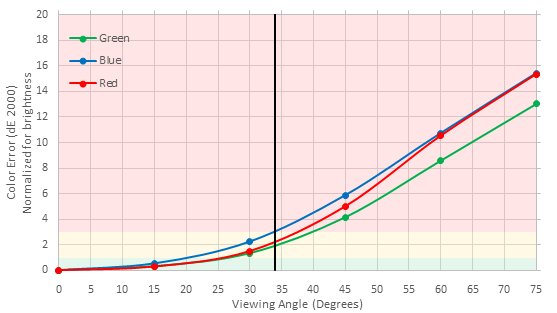
for pictures & test results
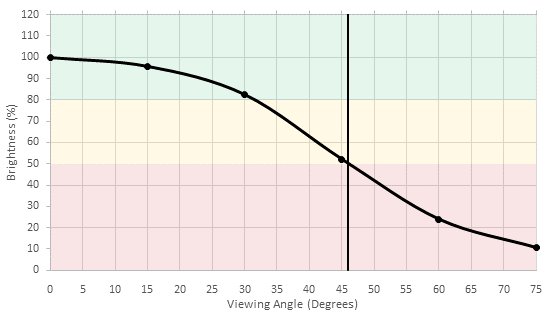
for pictures & test results
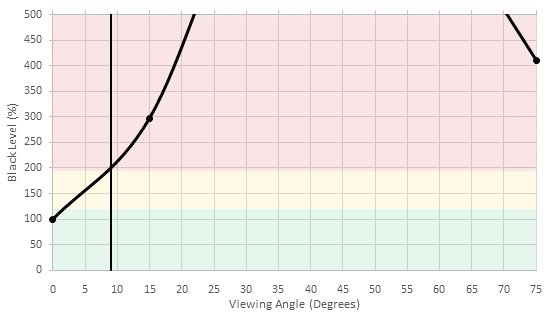
As with other IPS TVs, the TV can maintain good contrast and color saturation when viewed from the sides. Picture still begins to deteriorate at more extreme angles.
for pictures & test results

The LG UH8500's black uniformity is decent, without any obvious clouding or light bleeding.
for pictures & test results

The picture above shows the TV fed with a 10 bit input signal. Our 10 bit gradient pattern isn't displayed perfectly, showing some minor color gradation issues, but it is still a lot smoother than when the TV is fed with an 8 bit signal. 10 bit HDR content should then be free from obvious banding.


for pictures & test results

for pictures & test results

for pictures & test results

We were able to obtain great results with relative ease, although it always takes more time with the 20 point values. It does get more precise, though.
for pictures & test results

DVDs looks good when upscaled and keep a fair amount of details.

for pictures & test results

Blu-rays looks very sharp and crisp when played on this LG TV.
for pictures & test results

4k native content looks very good without any image quality issues.
for pictures & test results

The LG UH8500 offers the option to output a wider color gamut in all of its picture modes. It will be set to 'Wide' automatically when in the HDR picture mode. Unfortunately, even with the 'Wide' setting, the range of color doesn't increase much. TVs with higher DCI P3/Rec 2020 numbers are going to be better for HDR.
for pictures & test results
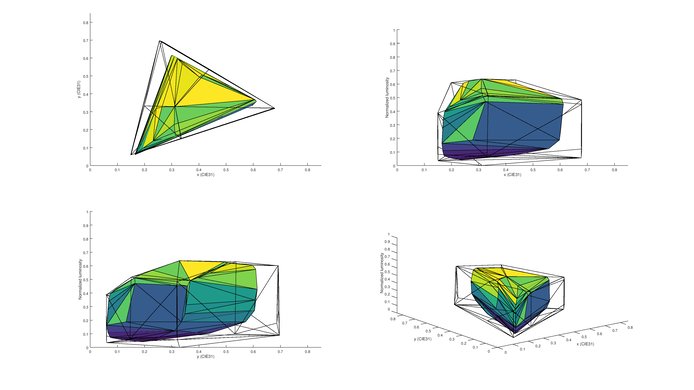
for pictures & test results
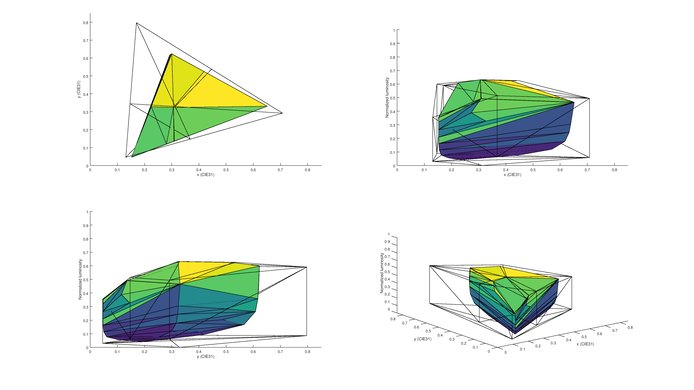
The UH8500 has good performance for DCI-P3, but at very high and very low luminosity colors lose their saturation.
for pictures & test results

The UH8500 TV have some image retention and it is a bit worse than what we have see on the UH9500. We can clearly make out the colored logos from the static image of the test video right after the 10 minutes exposure to the burn-in scene, but it was completely gone after 6 minutes of recovery.


for pictures & test results
As long as the TV is being watched from directly in front, there is no crosstalk to be seen. As with other 3D TVs, slight vertical angles or wide horizontal angles will create crosstalk.




Blu-ray movies play smoothly, as do movies played over cable or satellite. Streaming movies might show some judder if you do not enable motion interpolation (TruMotion).
for pictures & test results

for pictures & test results

Motion interpolation (TruMotion) has to be enabled to enjoy streaming movies without judder. The 'Smooth' pre-set will add the soap opera effect, but using a low custom value can remove judder without adding noticeable soap opera effect.
The 1080p input lag is low enough for any fast-paced game. The TV's lag even remains at playable levels outside game mode, allowing for more picture options to be enabled. Unfortunately, motion interpolation adds too much lag for games to be properly playable. Those looking for that option for gaming should look for a different TV.
Update 12/08/2016: With the newest firmware update (04.30.19) there has been the addition of a HDR gaming mode. In this mode the HDR input lag is lower, and should be fine for HDR gaming. Note that although the TV accepts a 4k @ 60Hz @ 4:4:4 + HDR signal, it can't accurately display the chroma subsampling in any HDR mode, even with the 'PC' icon selected.
It supports most standard PC resolutions, except for 1080p @ 120Hz. To enable chroma 4:4:4 for sharper text, go in the input menu and change the icon of the input to 'PC'. For 4k resolutions, you must also enable 'HDMI ULTRA Deep Color,' which you can find in the 'General' menu.
Input lag in PC mode is the same as in game mode.

for pictures & test results

1 Component In (need included adapter)
1 Composite In (need included adapter)
1 Digital Optical Audio Out
1 RF In
1 Ethernet
for pictures & test results

This TV was tested with "Magic Sound Tuning" enabled. Good low-end extension, especially for a TV. Very good maximum loudness too, however, the TV is likely to pump at higher volumes. The frequency response, after applying Magic Sound Tuning, improves noticeably and becomes flatter and more balanced.
for pictures & test results

Good distortion results overall; unremarkable performance.
for pictures & test results

Most of the popular apps are available, including YouTube, Netflix, Amazon Video, and a web browser. The overall number of available apps could be better, though.
for pictures & test results

LG has improved its already good WebOS smart platform to version 3.0. The presentation looks great, navigation is quick, and the app selection covers the basics. In terms of usability, WebOS still has the edge when compared with the smart platforms offered by other brands.
Ads can be found in the LG content store, and you can only opt-out of personalized advertising.
for pictures & test results

Control buttons for basic functions can be found under the middle of the TV, right under the LG logo.

for pictures & test results

- Remote
- Batteries
- Composite In adapter
- Component In adapter
- 2 pair of 3D glasses
- 1 cable tie
- Manuals


