
Many keyboards feature backlighting, with RGB options offering over 16 million colors for customization. While backlighting improves visibility in the dark, full RGB lighting can enhance your setup with color matching and reactive effects. If RGB is a priority, consider the number and location of lighting zones, software quality, and customization options when choosing a keyboard.
We've tested over 290 keyboards, and below are our recommendations for the best keyboards with RGB lighting. This list mostly consists of wired-only keyboards, as RGB backlighting on wireless keyboards tends to quickly drain the battery, especially with custom effects. If you're only interested in wireless models, check out our picks for the best wireless keyboards. For other options, see our recommendations for the best gaming keyboards and the best keyboards overall.
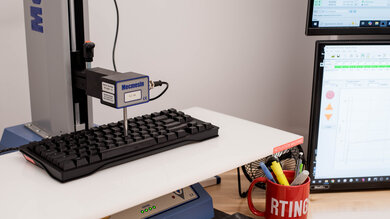
We test dozens of keyboards each year, and to maintain independence, we buy every unit ourselves. Our reviews go beyond subjective typing impressions or quick gaming sessions. Each keyboard is put through the same standardized test bench, so you can directly compare our results. We use specialized tools like a Mecmesin force tester to measure switch force curves and a Beagle 480 USB analyzer to capture input data for latency testing. Multiple teams contribute to each review in a process that can take days or even weeks from start to finish.
-
Best RGB Keyboard
 GamingOfficeMobile/TabletProgrammingEntertainment / HTPCRaw PerformanceSize:Full-size (100%)Hot-Swappable Switches:NoConnectivity:WiredSwitch Type:MechanicalSee all our test resultsOutput Type:Non-Adjustable
The Corsair K100 RGB is the best RGB keyboard we've tested for true RGB lighting fans. This keyboard has a whopping 44 RGB zones, including RGB strips along both sides and the top edge, as well as lighting around the programmable dial. You can also use this dial to toggle between lighting profiles or adjust backlighting brightness directly on the keyboard. You can program the lighting for each of these zones independently, or customize the lighting for any individual key using Corsair's iCUE software, which also lets you sync the lighting with other Corsair peripherals and hardware in your desktop setup.
This keyboard has a few other standout hardware features, including dedicated media keys and a column of programmable macro keys on the left side of the board. It supports a much higher-than-average maximum polling rate of 8000Hz and an effective update rate of 4000Hz. This helps it maintain extremely consistent split-millisecond latency, making it a standout choice for casual or competitive gaming in any genre. Not only that, but the Cherry MX Speed Silver switches are optimized for gaming, with an incredibly short pre-travel distance and a light actuation force. This keyboard's price tends to fluctuate, but it's at its best value when it falls to around $200 USD or less.
-
Best Upper Mid-Range RGB Keyboard
GamingOfficeMobile/TabletProgrammingEntertainment / HTPCRaw PerformanceSize:Compact (96%)Hot-Swappable Switches:YesConnectivity:WirelessSwitch Type:MechanicalSee all our test resultsOutput Type:Non-AdjustableIf you're shopping for options in the upper mid-range, we recommend the NuPhy Halo96 V2, a wireless model with an outstanding RGB implementation. We've highlighted the largest 96% size option here since it offers the most extensive RGB, but this keyboard is also available in a smaller, compact 75% layout if you'd like more room on your desk for mouse movements while gaming. This wireless keyboard features a high-profile design. In addition to backlighting, it also focuses on acoustics, with layers of silicone sandwiched inside and what NuPhy calls a 'GhostBar,' a spacebar with added polycarbonate and silicone pieces that dampen its sound and feel. You can buy this keyboard in several different expressive colorways and switch options. It also has a hot-swappable PCB, allowing you to replace the switches more easily if the stock options aren't to your liking.
When it comes to lighting, this keyboard has an impressive array of RGB zones that wrap around the entire keyboard, shining out from the translucent plastic bottom case. Unfortunately, the stock keycaps don't have shine-through legends, making them hard to see in dark rooms. That said, there's a set of helpful homing bars, which are shine-through slits on the 'F' and 'J' keys to help you quickly orient your hands on the home row in darker rooms. Additionally, NuPhy sells sets of shine-through keycaps on their website. Like the other options on this list, this keyboard comes with companion software that lets you adjust the brightness, color, and effects of the RGB lighting.
-
Best Mid-Range RGB Keyboard
GamingOfficeMobile/TabletProgrammingEntertainment / HTPCRaw PerformanceSize:Compact (75%)Hot-Swappable Switches:YesConnectivity:WirelessSwitch Type:MechanicalSee all our test resultsAnalog:The NuPhy Kick75 is an outstanding mid-range pick with a very interesting RGB implementation. It includes a transparent top portion that diffuses the light throughout the keyboard when you crank up the backlighting. Unfortunately, like the NuPhy Halo96/Halo75 V2 above, it also doesn't include shine-through keycaps, though NuPhy does sell extra sets. Aside from its RGB implementation, this keyboard has a very playful retro design. It's also available with a low-profile conversion kit that allows you to choose between using low-profile and regular profile switches, a very unusual feature that can give you a lot of flexibility to customize the keyboard to your liking over time.
Performance-wise, this is a very versatile keyboard. Its soft gasket-mount design, pre-lubed switches, and pre-lubed stabilizers give it an excellent typing experience right out of the box. It's also very quiet, particularly with the Silent Kailh Blush Max switches we tested, which use dampened stems to minimize noise. For connectivity, it supports wireless use via a 2.4GHz receiver or Bluetooth. On the performance side, the Kick75 holds up well. It delivers strong latency across the board and supports a 1000Hz polling rate both wired and wirelessly, making it a solid pick for casual and competitive gaming alike. It does produce occasional outlier latency spikes, but they're too small to notice during play. Only the most demanding competitive players might have reason to care.
-
Best Budget RGB Keyboard
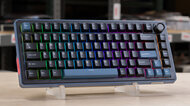
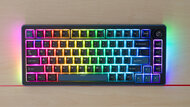
GamingOfficeMobile/TabletProgrammingEntertainment / HTPCRaw PerformanceSize:Compact (75%)Hot-Swappable Switches:YesConnectivity:WirelessSwitch Type:MechanicalSee all our test resultsOutput Type:Non-AdjustableWe recommend the Ducky OK-M as the best RGB keyboard on a budget. This is actually a small lineup of keyboards rather than a single model. They're available in 65%, 75%, and 98% sizes, so you can choose one based on your desk space and which keys you need. All models have the same attractive RGB backlighting, along with lighting zones on both sides that splash some extra color across your desk. Just be aware that these keyboards come in Black and Black and Blue colorways. We tested the Black and Blue colorway pictured above. The Black colorway is harder to find but is listed with shine-through keycaps, which you might prefer if you want to make the most of the backlighting and read the legends in the dark.
Overall, these keyboards have very good build quality, with tight fit and tolerances. However, their plastic chassis has a little more flex, and their keys have slightly more wobble than those on our more expensive mid-range pick, the NuPhy Kick75 above. The gasket mount is also soft and well-implemented, though it feels a bit mushier rather than super springy and responsive. The typing noise is also a little on the louder side, but the sound signature is very pleasant and 'thocky'. These keyboards also support the VIA configurator, a popular open-source, web-based tool used with many custom mechanical keyboards. It's intuitive and easy to use, though it offers fewer lighting customization options than NuPhy's software. It also can't synchronize the lighting with other peripherals and hardware like the software for our top pick, the Corsair K100 RGB.
-
Best Cheap RGB Keyboard
GamingMobile/TabletOfficeProgrammingEntertainment / HTPCSize:TenKeyLess (80%)See all our test resultsConnectivity:WiredThe SteelSeries Apex 3 TKL is the best cheap RGB keyboard we've tested. While most keyboards at this price point offer only zone lighting or can display only one color at a time, this one has full RGB backlighting and eight customizable zones. The keycaps also include shine-through legends, which is ideal if you want to use the keyboard at night. You can customize these zones and other features of this keyboard using SteelSeries' GG software.
As you'd expect, this keyboard won't perform as well as our budget pick above. The slightly high latency makes the board best suited for casual rather than fast-paced gaming. The rubber dome switches don't feel as snappy and responsive as the mechanical switches in our budget pick, the Ducky OK-M. While it's good, especially considering the very low price point, the build quality also lags behind pricier units, with cheap ABS plastic keycaps that easily collect oil from your fingers and a thin, somewhat flimsy-feeling all-plastic chassis.










Notable Mentions
-
Logitech G715:
The Logitech G715 has a white aesthetic that may be a better fit for your setup if it already incorporates many white elements. It also boasts an impressive RGB lighting array with a strip around the frame, creating a nice underglow effect. However, it's missing a numpad, which may not be to everyone's taste. Also, compared to the Corsair K100 RGB, its color mixing isn't as good and shows a noticeable bluish hue.
See our review -
Razer Huntsman Mini:
The Razer Huntsman Mini is a compact 60% model that's typically around the same price as the Ducky OK-M. It offers better gaming performance. However, it doesn't quite match it in build quality or RGB brightness, and it lacks additional strips of lighting on the sides.
See our review
Recent Updates
Aug 11, 2026:
We've removed the Corsair K65 RGB MINI because it's no longer reliably in stock. The Ducky OK-M is our new 'Best Budget RGB Keyboard' pick.
Apr 16, 2026:
We moved the NuPhy Halo96/Halo75 V2 as our new upper mid-range keyboard. The NuPhy Kick75 replaces the ROCCAT Vulcan II Max as our new mid-range pick. We also replaced the now-discontinued Razer Cynosa V2 with the SteelSeries Apex 3 TKL as our new cheap pick. Other picks are still valid and available.
Mar 10, 2025:
We've moved the Razer Huntsman Mini from its spot as our budget pick to the Notable Mentions section. In its place, we've added the Corsair K65 RGB MINI, which, while typically more expensive, offers better build quality and brighter, more extensive RGB backlighting.
Dec 09, 2024:
We've reorganized this article to better represent the current market, introducing a new 'Best Wireless RGB Keyboard' category and eliminating our 'Best Upper Mid-Range RGB Keyboard' category. We've also made small edits for clarity.
Sep 13, 2024: We've replaced our mid-range pick, the NuPhy Halo 96, with its successor, the NuPhy Halo 96 V2. It's slightly more expensive but has significantly more extensive RGB lighting. We've also removed the Corsair K95 Platinum from our list of Notable Mentions, as it's now discontinued and getting much harder to find.
All Reviews
Our recommendations above are what we think are currently the best RGB membrane and best RGB mechanical keyboards for most people. We factor in price, visitor feedback, and availability.
If you'd like to do the work of choosing yourself, here's the list of all our keyboard reviews. Be careful not to get too caught up in the details. While no keyboard is perfect for every use, most are good enough to please almost everyone, and the differences are often not noticeable unless you really look for them.