
We've tested over 295 keyboards, including more than 40 made by Logitech. The best Logitech keyboard for your needs depends on whether you prioritize gaming performance, typing comfort for work, or portability. For gaming, consider whether you want wireless connectivity or magnetic switches with adjustable actuation. For work and everyday use, the keyboard's layout, typing feel, and the ability to switch connections between devices may matter more to you.
Below are our recommendations for the best Logitech keyboards we've tested across different uses and budgets.
Updates
- 07/23/2026Logitech G316 X reviewed
- 06/10/2026Logitech G512 X reviewed
- 02/05/2026Logitech Alto Keys K98M reviewed
- 11/12/2025Logitech G515 RAPID TKL reviewed
- 09/04/2025Logitech Flip Folio reviewed
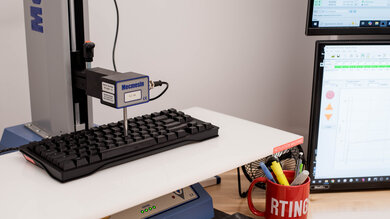
We test dozens of keyboards each year, and to maintain independence, we buy every unit ourselves. Our reviews go beyond subjective typing impressions or quick gaming sessions. Each keyboard is put through the same standardized test bench, so you can directly compare our results. We use specialized tools like a Mecmesin force tester to measure switch force curves and a Beagle 480 USB analyzer to capture input data for latency testing. Multiple teams contribute to each review in a process that can take days or even weeks from start to finish.
-
Best Logitech Keyboard
 GamingOfficeMobile/TabletProgrammingEntertainment / HTPCRaw PerformanceSize:Full-size (100%)Connectivity:WirelessBluetooth:See all our test resultsBluetooth Multi-Device Pairing:
The best Logitech keyboard we've tested is the Logitech G915 X LIGHTSPEED and is our recommendation if you want a full-size wireless model for gaming and everyday use. It delivers exceptionally low latency that's ideal for competitive play. It also has dedicated macro and media keys, customizable RGB backlighting with clear shine-through legends, and a volume roller for quick adjustments while gaming or watching content. Compared to previous Logitech G915 LIGHTSPEED models, this newer version has improved build quality, including a slightly thicker aluminum top plate and more durable doubleshot PBT keycaps. It connects wirelessly with Bluetooth or its USB receiver, though it can only pair with one Bluetooth device at a time.
This keyboard's low-profile design also makes it comfortable to type on without needing a wrist rest, and you can adjust the typing angle with the feet on the underside to suit your preferences. It's available in black or white and comes with your choice of linear, tactile, or clicky switches. Choosing between these options just depends on whether you prefer a smooth keypress, a noticeable tactile bump, or a tactile bump paired with an audible click. If you don't have room for a full-size board on your desk or you don't need a numpad, consider the Logitech G915 X LIGHTSPEED TKL instead. It's a smaller TenKeyLess version of this keyboard that retains the same low-profile design and dedicated media controls while freeing up more space on your desk for wider mouse movements.
-
Best Mid-Range Logitech Keyboard
GamingOfficeMobile/TabletProgrammingEntertainment / HTPCRaw PerformanceSize:Full-size (100%)Connectivity:WirelessBluetooth:See all our test resultsBluetooth Multi-Device Pairing:The Logitech MX Keys S is the best Logitech keyboard for office work and everyday use, and is our recommendation if you're shopping in a mid-range price bracket. This is Logitech's flagship office unit, and they've paid close attention to the details. The chiclet-style keycaps have a nice indent to help you strike each key in the center and avoid typos, while its low profile lays nearly flat on your desk, so you don't have to bend your wrists upward to reach the keys. It's a great choice if you're used to typing on a laptop, as it has stable, responsive-feeling scissor switches with a similar feel. It also has white backlighting that adjusts to the lighting conditions around you, so your keys are clearly visible at any time of day.
This keyboard offers highly versatile wireless connectivity, and Logitech advertises up to 10 days of battery life with the backlighting on or five months with it off. You can pair it with up to three devices using Bluetooth or the included LOGI BOLT USB receiver, which also works with select Logitech mice. That said, if you have a more compact desk or need a portable option, Logitech also makes a smaller version called the Logitech MX Keys Mini. This version doesn't include a wireless USB receiver, so it's best if your device has Bluetooth.
Alternatively, if you're still looking for options in this price range but prefer the feel of mechanical switches, consider the Logitech Alto Keys K98M. Its gasket mount creates a softer, springier feel, though it's quite a bit louder than the very quiet MX Keys S models, which may be an issue if you work in a shared space.
-
Best Budget Logitech Keyboard
GamingOfficeMobile/TabletProgrammingEntertainment / HTPCRaw PerformanceSize:Full-size (100%)Connectivity:WirelessBluetooth:See all our test resultsBluetooth Multi-Device Pairing:The best budget Logitech keyboard we've tested is the Logitech Signature K650. It's a full-size option with plenty to offer for work or everyday browsing. It has great built-in ergonomic features like an integrated soft-touch wrist rest, two incline settings, and deep-set keys, so your fingertips rest directly on top of them, minimizing wrist extension. The trade-off is that its rubber dome switches aren't as snappy and satisfying to type on as the scissor switches found in the more expensive Logitech MX Keys S mentioned above. Still, it's very quiet to type on, and due to the design of rubber dome switches, it's relatively spill-resistant, which can come in handy if you frequently eat or drink near your keyboard.
Compared to the MX Keys S, it also lacks multi-device pairing and backlighting. However, it includes media and shortcut keys along the top, including a microphone mute shortcut for video calls, plus an operating system toggle for Windows, macOS, and ChromeOS. It connects wirelessly using its included USB receiver or Bluetooth, though it can only pair with one Bluetooth device at a time. Rather than a rechargeable battery, it uses two AA batteries, which Logitech advertises will last up to 36 months.
-
Best Cheap Logitech Keyboard
GamingOfficeMobile/TabletProgrammingEntertainment / HTPCRaw PerformanceSize:Compact (75%)Connectivity:WirelessBluetooth:See all our test resultsBluetooth Multi-Device Pairing:The Logitech Pebble Keys 2 K380s is the best cheap Logitech keyboard and a great choice for anyone who values portability. Its thin, compact design makes it easy to toss into a bag or move between spots in your home or office. Unlike the larger Logitech Signature K650 above, it lacks a numpad, but it supports Bluetooth pairing with up to three devices, letting you switch between a computer, tablet, or phone. It uses two AAA batteries, which Logitech advertises will last up to 36 months. It also comes in a few subtle color options, including white and rose, to help you color coordinate with your existing setup.
Its scissor switches provide a responsive typing feel that will be familiar if you're used to typing on a laptop. However, its circular keycaps and slightly tighter key spacing can feel cramped and may take some getting used to. It also lacks backlighting and doesn't include a USB receiver in the box, so your device needs Bluetooth unless you buy a compatible receiver separately.
-
Best Enthusiast Logitech Keyboard
GamingOfficeMobile/TabletProgrammingEntertainment / HTPCRaw PerformanceSize:TenKeyLess (80%)Connectivity:WiredBluetooth:See all our test resultsBluetooth Multi-Device Pairing:The Logitech G PRO X TKL RAPID is our recommendation for competitive gaming enthusiasts who want adjustable actuation and Rapid Trigger. Unlike the wireless Logitech G915 X LIGHTSPEED above, this wired-only TKL keyboard uses magnetic Hall effect switches that let you adjust each key's actuation point. This means you can make individual keys more sensitive for faster inputs or less sensitive to reduce accidental presses. Its Rapid Trigger feature also lets keys reset without returning to a fixed point, which can help with rapid repeated inputs in FPS and rhythm games.
You can adjust all the keyboard's settings in the Logitech G HUB software. It's intuitive, though it can be resource-hungry. This keyboard is available in black, white, and pink colorways. It also offers quality-of-life features like dedicated media controls and a volume roller, which can make a big difference if you often watch or listen to content on a second screen while gaming. RGB lovers will also appreciate the bright per-key backlighting and impressively clear shine-through legends. Build quality is good overall, but the switch stems have some noticeable wobble. This is a minor but fairly common issue with magnetic switches, though it may still be irritating if you also plan on typing with this keyboard for long stretches.















Compared To Other Brands
-
Versatile lineup for office, gaming, and mobile.
Logitech produces a wide range of keyboards for different uses: productivity, gaming, and mobile use.
-
Various sizes.
Logitech makes keyboards in various sizes from full-size options for gaming or work to compact keyboards for traveling.
-
Configuration software supports Windows and macOS.
Logitech has several different pieces of companion software, including Logitech G HUB and Logitech Options+. Both of these software suites are compatible with macOS and Windows operating systems and offer plenty of customization options.
-
Macro programmability can be limited to certain keys.
This is particularly true of Logitech's MX and K-series productivity models, but it also applies to some of its older G-series gaming models, where macro programming is limited to specific keys rather than available on every key.
-
Intrusive software.
Logitech's various software options offer plenty of customizable options, but they also receive criticism from the community for consuming excessive resources and requiring frequent updates. While some Logitech keyboards have onboard memory to save your custom preferences, certain settings, including application-specific profiles or RGB lighting, may require the software to remain running in the background.
Logitech vs Corsair
While Logitech makes keyboards for different uses, Corsair focuses primarily on gaming keyboards. Both offer capable gaming models, but some Corsair keyboards provide more hardware customization, including hot-swappable switches that let you change the typing feel without replacing the whole keyboard. Logitech offers a broader selection for office work and everyday use, including slim, laptop-style models with multi-device pairing. You can check out our recommendations for the best Corsair keyboards.
Logitech vs Razer
Compared to Logitech, Razer has a comparatively smaller lineup and focuses primarily on gaming keyboards, although they've recently started offering a limited number of models aimed at office use. Both companies make highly capable gaming keyboards, so the better choice depends on what features you're looking for, such as wireless connectivity, adjustable actuation switches, or dedicated media controls. You can check out our recommendations for the best Razer keyboards.
Logitech vs Keychron
Both Logitech and Keychron make a wide variety of keyboards for office work, everyday use, and gaming. Some of Logitech's models also offer cross-device compatibility within their wider peripheral system, meaning you can use a single USB receiver for a mouse and a keyboard combination. However, the most significant difference between these brands is that Keychron's keyboards are available in a much wider variety of sizes and layouts, including many models with hot-swappable switches that let you change the typing feel. You can see our recommendations for the best Keychron keyboards.
Overall, Logitech makes keyboards for a wide range of uses, from ergonomic office models and compact boards for travel to mechanical and magnetic gaming keyboards. Logitech keyboards are particularly worth considering if you want a slim, laptop-style typing experience, multi-device pairing for work, or a gaming keyboard to complement other Logitech peripherals. However, features and customization options vary considerably between models, so check whether the keyboard you choose supports the connectivity and key remapping you need.
Lineup
MX Series: This is Logitech's premium lineup of wireless keyboards designed for productivity. The lineup includes laptop-style scissor-switch models and mechanical options, with full-size and compact layouts available. They also support multi-device pairing that lets you switch between up to three connected devices, including computers, tablets, or phones, while Logitech Options+ provides customization options such as shortcuts and macros on select keys. Some models also come in Mac-specific versions with Mac key legends.
K Series: The K Series consists of keyboards designed for everyday and general use. They're typically wireless and use membrane or scissor switches. They range in price but are more budget-friendly than the MX or G series boards. Most of them include a way to use the keyboard with a USB receiver or Bluetooth connection, though some, like the Logitech Pebble Keys 2 K380s, are Bluetooth-only. Software varies between models, but these keyboards typically use Logitech Options or the Options+ software. However, customization is more limited compared to MX or G Series boards.
G Series: The G Series is Logitech's gaming lineup. Many of these keyboards are premium mechanical or magnetic boards that deliver high-end gaming performance. These keyboards use Logitech's G HUB customization software and generally offer more extensive key remapping, macro programming, and lighting controls than MX or K models.
Other: Logitech also offers keyboards that fall outside the above series, like the Logitech Wave Keys, an office keyboard with a curved and slightly tented ergonomic design.
Recent Updates
Oct 01, 2026:
We've updated the 'Compared To Other Brands' and 'Lineup' sections with current information. We've also revised the intro to provide clearer buying considerations and refreshed the text in several recommendations to better explain who each keyboard is best suited for and highlight tradeoffs between picks.
Jul 23, 2026:
We've corrected the table at the end of the page so it now displays only Logitech keyboards. We've also made a few small text changes to provide more experiential detail and clarify the trade-offs of our recommendations. Our picks remain unchanged.
May 28, 2026:
We haven't changed any of our primary recommendations in this update, but we've replaced mention of the Logitech G515 RAPID TKL in our top pick's text with the Logitech G915 X LIGHTSPEED TKL, a compact TenKeyLess version of our current top pick. We've also made a few small wording clarifications around macro limitations on some Logitech models.
Mar 17, 2026:
We added the Logitech G515 TKL RAPID as an alternative to our top pick for people looking for a TKL board or a keyboard that uses magnetic switches. We also added the Logitech Alto Keys K98M as an alternative to the Logitech MX Keys S.
Feb 05, 2025:
We've replaced the Logitech G715 with the Logitech G915 X Lightspeed as the 'Best Logitech Keyboard' pick since it's a full-size board that is a better option for most people who want a one-stop shop for gaming and productivity needs. We also added a new 'Best Enthusiast Logitech Keyboard' category and made small edits for clarity.


