
Razer's product lineup is heavily focused on gaming; even their office-oriented models have gaming in mind! So, if you're looking for the best Razer gaming keyboard, you've got a ton of options, from entry-level rubber dome models to premium models with proprietary optical switches. Regardless of what model you spring for, you'll get a well-built unit with extremely low latency right out of the box. Since these keyboards all work with Razer's companion software, pairing a Razer keyboard with other Razer peripherals means you only need a single piece of software to customize your setup's lighting effects and other features.
For a deeper dive into our processes, check out our R&D article. If you're interested, take a look at the work that went into our 1.4 test bench update, which evaluates gaming keyboards with adjustable actuation settings like our top pick in this article, the Razer Huntsman V3 Pro 8KHz.
Updates
- 06/02/2026Razer Pro Type Ergo reviewed
- 02/13/2026Razer Huntsman V3 Pro 8KHz reviewed
- 07/31/2025Razer Joro reviewed
- 11/27/2023Razer Huntsman V3 Pro [Mini, TKL] reviewed
- 10/13/2023Razer BlackWidow V4 75% reviewed
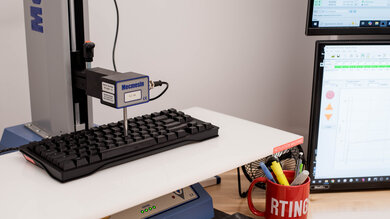
We test dozens of keyboards each year, and to maintain independence, we buy every unit ourselves. Our reviews go beyond subjective typing impressions or quick gaming sessions. Each keyboard is put through the same standardized test bench, so you can directly compare our results. We use specialized tools like a Mecmesin force tester to measure switch force curves and a Beagle 480 USB analyzer to capture input data for latency testing. Multiple teams contribute to each review in a process that can take days or even weeks from start to finish.
-
Best Razer Keyboard
 GamingOfficeProgrammingMobile/TabletEntertainment / HTPCSize:TenKeyLess (80%)Hot-Swappable Switches:NoConnectivity:WiredSwitch Type:OpticalSee all our test resultsOutput Type:Analog
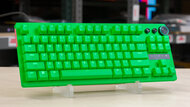
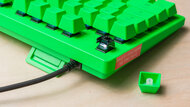
The Razer Huntsman V3 Pro 8KHz is the best Razer keyboard we've tested. It's a major improvement over the previous generation Razer Huntsman V3 Pro with a higher maximum polling rate, more precise switches, and improved dampening, and it delivers some of the lowest latency we've ever measured. This keyboard's strength lies in its customizability. It uses Razer's Analog Optical switches, which let you control the actuation distance of individual keys. It also supports Rapid Trigger, a feature that lets you dial in how far your keys need to travel back upward before you can activate them again. This feature can give you a small but meaningful competitive advantage over more conventional mechanical keyboards when making fast follow-up inputs. You can make these adjustments directly on the keyboard using hotkey combinations or in the software, and your custom settings stay enabled without the configuration software running in the background.
If you need a numpad, this keyboard is also available as a full-size model. It comes in more understated black or white colorways if the esports green model we tested is a bit too flashy for your tastes. Altogether, these keyboards are great for fine-tuning your keyboard to your play style or the games you play. However, their primary focus is gaming customizability, so they aren't standout picks for everyday browsing or productivity. They lack Bluetooth support, and their more sensitive switch settings make it harder to type without making typos. If you're more interested in a keyboard that excels at both work and play, check out our picks below.
-
Best Upper Mid-Range Razer Keyboard
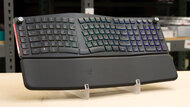
GamingOfficeProgrammingMobile/TabletEntertainment / HTPCSize:Full-size (100%)Hot-Swappable Switches:NoConnectivity:WirelessSwitch Type:ScissorSee all our test resultsOutput Type:Non-AdjustableAt an upper mid-range price point, we recommend the Razer Pro Type Ergo. Unlike Razer's more gaming-focused models, this keyboard is designed with both gaming and productivity in mind. It has a split ergonomic design, an integrated padded wrist rest, and adjustable feet that provide both tenting and negative tilt options, which can help keep strain to a minimum during long sessions.
It doesn't use Razer's mechanical, optical, or Analog Optical switches. Instead, it has low-profile scissor-style keys that feel similar to a good-quality laptop keyboard. They don't feel as satisfying as the full-travel mechanical switches on the related Razer Pro Type Ultra, our mid-range pick below, but they're much quieter than typical mechanical switches, making this keyboard better suited for shared workspaces. You also get Bluetooth support, a 2.4GHz receiver, USB-C wired connectivity, five dedicated macro keys, and programmable command dials that you can customize in Razer's software.
However, its full-size ergonomic shape takes up a lot of desk space, and the unusual key arrangement can take some time to get used to. If you mainly play competitive games and want the lowest latency or the most gaming-focused customization features, you're still better off with the Razer Huntsman V3 Pro 8KHz above.
-
Best Mid-Range Razer Keyboard
GamingOfficeProgrammingMobile/TabletEntertainment / HTPCSize:Full-size (100%)Hot-Swappable Switches:NoConnectivity:WirelessSwitch Type:MechanicalSee all our test resultsOutput Type:Non-AdjustableAt its core, the Razer Pro Type Ultra is a gaming keyboard dressed up for an office job, much like the Razer Pro Type Ergo above, which isn't surprising since they're part of the same lineup. The major difference is that this keyboard has a more traditional straight full-size design and uses mechanical switches, giving it a more satisfying full-travel typing experience. It also has a sophisticated office-friendly look, with a silver-and-white color scheme and white-only backlighting instead of RGB. However, it still delivers excellent latency performance, even for competitive games. You also get three connection options: wired, Bluetooth with up to three devices, or a USB receiver that pairs with some other Razer office peripherals. Razer advertises over 200 hours of battery life with the backlighting off, which should last most people through the workweek and beyond on a fresh charge.
It feels very comfortable and pleasant to type on. It uses linear Razer Yellow switches, which are light, smooth, and fairly quiet compared to many other mechanical switch types. The keycaps are made of PBT plastic and have a slightly textured surface that adds a bit of extra grip, which is helpful if you're prone to sweaty hands. There's also a cushioned wrist rest for added support during long workdays.
-
Best Budget Razer Keyboard
GamingOfficeProgrammingMobile/TabletEntertainment / HTPCSize:Compact (60%)See all our test resultsConnectivity:WiredIf the premium options are a bit out of your price range, we recommend the Razer Huntsman Mini as a more budget-friendly choice. It's a bit older, which has helped drive down its price. It uses Razer optical switches instead of standard mechanical ones, and is available in clicky or linear varieties. These switches feel like standard mechanical switches but use a beam of light to register inputs, helping deliver extremely low latency. They're also very light to actuate, so you don't have to press your keys very far to register inputs. You also get all the standard customization features through Razer's software, including macro-programming and per-key RGB lighting effects.
The build quality is excellent, too, though a wrist rest would help during longer sessions, and this keyboard doesn't come with one. It has a gaming-friendly compact size that takes up very little room on your desk, giving you plenty of space for dynamic mouse movements. However, this also means that it's far from ideal if you also use your keyboard for work, especially if you work with spreadsheets, data entry, or any other task that might require arrow keys or a numpad.












Compared To Other Brands
-
Tons of customization options.
Most Razer keyboards let you reprogram keys, set macros, and create custom profiles. Many also offer per-key RGB lighting customization, and some models feature optical analog switches, allowing you to adjust actuation distance for individual keys and enable advanced gaming features like Rapid Trigger and SOCD.
-
Well-built designs.
Razer builds most of its keyboards with high-quality plastics and some metal pieces. Most full-size models also come with comfortable wrist rests.
-
Available in a variety of switches.
Razer keyboards use a variety of switch types and technologies, making it easy to find one that suits your preferences. Their lineup includes standard mechanical and rubber dome switches, as well as more advanced optical analog switches that let you adjust actuation and reset distances on a per-key basis.
-
Software can feel bloated.While Razer's Synapse software is easy to use and provides a wide range of adjustable settings, it receives criticism for consuming a disproportionate amount of your system's resources and requiring frequent updates. Furthermore, certain settings, including custom RGB lighting, typically require the software to run in the background to function.
-
Expensive for their quality.
Razer keyboards are typically a bit more expensive than keyboards from competitors with similar feature sets.
Razer vs Corsair
Corsair keyboards tend to use premium materials, with many models featuring high-quality aluminum top plates and durable PBT keycaps. In contrast, Razer models are generally more straightforward, with fewer features. However, both manufacturers have significantly improved their materials and overall build quality in recent years as they take more active inspiration from the custom mechanical keyboard market. In terms of performance, both brands continue to push the envelope with features like 8000Hz polling rates and analog switch technologies. Ultimately, you can't go wrong with a model from either brand; it comes down to personal preference and the features that best suit your setup. To compare for yourself, see our recommendations for the best Corsair keyboards.
Razer vs SteelSeries
Compared to SteelSeries, Razer offers a broader selection of models, including productivity-focused options like the Pro Type Ultra. SteelSeries' flagship Apex Pro series competes directly with Razer's Huntsman lineup, both featuring adjustable actuation switches and advanced features like Rapid Trigger. However, Razer's Huntsman Analog boards stand out with an 'Analog Mode' that provides finer control over in-game movements by emulating joystick input.
Razer vs Logitech
Razer has a comparatively narrow range of products compared to Logitech, a major worldwide manufacturer of keyboards for gaming and office use. Logitech's keyboard products come in an extremely wide range of switches, including membrane, scissor, and mechanical, while Razer units typically employ membrane or mechanical switches. However, Razer utilizes more technologically advanced optical-mechanical and analog switches on some of their higher-end models. Razer products are designed almost exclusively for gaming use, so they often have better latency, RGB implementation, and customization over Logitech. To see how they stack up for yourself, see our recommendations for the best Logitech keyboards.
Razer makes a good range of wired and wireless models designed in different form factors, almost entirely intended primarily for gaming use. Their models are well-built and have extremely low latency, delivering extremely responsive in-game performance. However, they typically have fewer extra hardware features and can be pricier than similar keyboards from other gaming brands. As a plus, most of their keyboards also come in various sizes with various switch types, so you can find a configuration that suits your needs and preferences.
Lineup
Huntsman: The Huntsman series of keyboards is a premium gaming model for enthusiasts and competitive players. Wired and wireless versions are available with optical or analog optical switches in either full-size, TKL, or 60% Compact form factors.
BlackWidow: Razer's BlackWidow keyboards are straightforward mid-range to upper mid-range mechanical gaming models. They are available with linear or tactile switch options, as wired or wireless models, and in full-size or TKL form factors.
Deathstalker: The Deathstalker series of keyboards is a high-end, low-profile option that is much slimmer than standard mechanical gaming keyboards. This lineup currently features wired or wireless variants in a full-size or TKL form factor.
Ornata: Razer's Ornata keyboards are budget or cheaper models that use hybrid 'mecha-mechanical' switches, which are membrane switches that mimic the feel of mechanical switches. These are great choices for casual gaming but don't offer the same gaming performance as higher-priced options from Razer. Furthermore, the most recent models in this lineup have full RGB zone lighting, but you can't adjust the lighting on a per-key basis as you can with Razer's more expensive models, and the included wrist rest is made of plastic rather than memory foam.
Pro Type: The Pro Type series of keyboards is productivity-focused and falls between a mid-range and an upper mid-range price point. These keyboards include more productivity features, office-friendly aesthetics, Bluetooth connectivity, and support for multi-device pairing. These keyboards also place a greater emphasis on ergonomics and typing quality but have minimal customizability in terms of lighting and are only available in a full-size form factor.
Recent Updates
Jun 24, 2026:
We've added the Razer Pro Type Ergo as our new 'Best Upper Mid-Range' pick. We've also moved the Razer Pro Type Ultra from 'Best Upper Mid-Range' to 'Best Mid-Range.' We've removed our previous 'Best Mid-Range' pick, the Razer BlackWidow 75%, from our list due to a high volume of buyer reports of repeat input issues.
Mar 23, 2026:
We replaced the Razer Huntsman V3 Pro and the Razer BlackWidow V3 with their successors, the Razer Huntsman V3 Pro 8KHz and the Razer BlackWidow V4 75%, respectively. Both new models make some small improvements on great formulas.
Mar 06, 2025:
Our picks remain unchanged, but we've added text in several sections to highlight emerging market trends and how Razer's keyboards compare to other major brands.
Dec 06, 2024:
We've verified that all our recommendations are available and represent the best choices. We've also made small edits for clarity.
Sep 10, 2024: We've reviewed our recommendations and the accompanying text in this article. No changes were made, as our picks still represent the best options in their respective categories.
Conclusion
Those were our recommendations for the best Razer keyboards, but Razer offers a wide range of boards with outstanding gaming performance. Their keyboards have excellent build quality and come in a wide range of switches to suit your preferences, but they can be pricey, especially immediately following their launch. Given Razer's wide range of offerings, you'll likely find a keyboard that suits your needs and budget.