
Our Verdict
Good TV for mixed usage. Picture quality is good, and so is dark scene performance. No features such as local dimming to improve it further. Picture quality degrades when viewed at an angle. Motion handling is above average for fast paced content.
- High native contrast results in good dark scene performance
- Feels responsive
- Image loses contrast at an angle
- Some dirty screen effect
- Doesn't deal with reflections well
Average for watching movies in a dark room. Picture quality is good, but degrades when viewed at an angle. High native contrast ratio but lacks local dimming feature to improve dark scene performance further. Those sensitive to judder will notice it when watching movies.
Slightly above average for watching TV in a bright room. Average at dealing with reflections. Whole screen can't get bright to fight glare. Picture quality is good, but degrades when viewed from an angle. Smart platform works well for watching media or files on a USB.
Above average for watching sports. Picture quality is good, but degrades when viewed at an angle. Motion blur is slightly better than average. Whole screen can't get bright to combat glare.
Great for console gamers. Input lag is low across all sources, which is great. Picture quality is good. Motion blur is average, which should be ok for most people.
Supports HDR10, but can't really benefit from it. Good picture quality but doesn't support a wide color gamut or high peak brightness to take advantage of HDR content. Lacks local dimming.
Supports HDR10 and can activate game mode for low input lag. Picture quality is good but doesn't benefit from the extra HDR information. Can't display a wider range of colors and can't get very bright highlights.
Good PC monitor. Supports a wide range of resolutions with chroma subsampling for clear text. Feels responsive with low input lag. Picture quality is good and motion handling is average.
Check Price
Differences Between Sizes And Variants
We tested the 55" (UN55KU6500), version FA01. For the most part, we expect our review to be valid for the other sizes.
If someone comes across a different type of panel or if their Samsung KU6500 doesn't correspond to our review, let us know and we will update the review.
| Size | Model |
| 49" | UN49KU6500 |
| 55" | UN55KU6500 |
| 65" | UN65KU6500 |
Popular TV Comparisons

The Samsung KU6500 provides good picture quality, especially in a dark room, but unfortunately it is priced well above the competition. As a result it is up against some higher end TVs, with additional features to improve the picture quality. Keep this in mind when viewing our recommendations below.

We buy and test dozens of TVs yearly, taking an objective, data-driven approach to deliver results you can trust. Our testing process is complex, with hundreds of individual tests that take over a week to complete. Most of our tests use specially designed test patterns that mimic real content, but we also use the same sources you have at home to ensure our results match the real-world experience. We use two main tools for our testing: a Colorimetry Research CR-100 colorimeter and a CR-250 spectroradiometer.
Test Results
Older Test Bench: We tested this product using an older TV test methodology before a major update. Some of the test results below aren't directly comparable with other TVs. Learn more
for pictures & test results

The KU6500 has the iconic Samsung design, with a central stand which supports the TV well. The stand has a fairly small footprint and is the only visible difference from the KU6600. The back of the TV has corrugations which look OK, but not as nice as some of the higher end models.


for pictures & test results

The borders are an average thickness, and there is some space between the edge of the border and the start of the picture.
for pictures & test results

The curve of the TV makes it appear quite bulky from the side. It will stick out a bit if wall mounted.
for pictures & test results

The native contrast ratio is good on the KU6500. The blacks look deep and should provide a very good dark room viewing experience.
for videos & test results

There is no local dimming feature on the KU6500. The 'UHD Dimming' which is advertised is a frame dimming feature, which can only be disabled by activating PC mode. It reduces the whole screen brightness when the scene is mostly dark.
The SDR peak brightness is bellow average for the KU6500 and remains almost the same whether in SDR or HDR mode, which is a good thing, especially for watching normal TV content. At this level of peak brightness, this TV would be best if situated in a darker room.
The peak brightness of small windows is reduced by the 'UHD Dimming'. The effect of this is reduced in 'Movie' mode but the only way to completely disable it is to switch to a 'PC' icon. When in PC mode, the screen brightness is 400 and remains the same at all size windows
The peak brightness stays relatively the same whether HDR is active. This can be seen as a good thing since most of the TV content is in SDR.
for pictures & test results

The gray uniformity is average and the result is very similar to what we had on the KU6300. All borders are darker leaving the center a bit more warm than the rest of the screen. Some horizontal bands are visible, but overall the center of the screen is smooth. Dirty screen effect is visible, but should not be so distracting.
for videos & test results

When viewed at an angle, the contrast of the image is reduced and colors lose accuracy. This is a very similar result to other VA TVs, even the high end Samsung KS* Series. This is okay for fairly narrow seating, but may be distracting for those who regularly watch from an angle.
Update: We have changed the methodology of testing. Since this is an old TV which we don't have anymore, we extrapolated the results.

for pictures & test results

The KU6500 can display a 10 bit gradient smoothly, which is the same as the other Samsung TVs released this year. Some minor issues can be seen in the darker shades, mostly in the green, but this should not be visible while watching normal content.
for pictures & test results

for pictures & test results

for pictures & test results

Prior to calibration, the white balance is a bit off as the image is slightly too warm. The gamma tracks close to the desired 2.2 value, which is good. For most people a calibration is not necessary.
for pictures & test results

for pictures & test results

for pictures & test results

The TV adjusts quite well using the inbuilt 2 and 20 point white balance. All minor issues are resolved, and the colors appear very accurate. You can see our recommended settings here.
for pictures & test results

Low quality content such as DVDs or cable TV are upscaled well. Most of the details is preserved, and the image doesn't appear too soft.
for pictures & test results

720p content looks quite good. Some halo artifacts can be seen along edges, but the image isn't too over sharpened.
for pictures & test results

1080p content such as Blu-rays look good. The image remains clear and sharp.


for pictures & test results
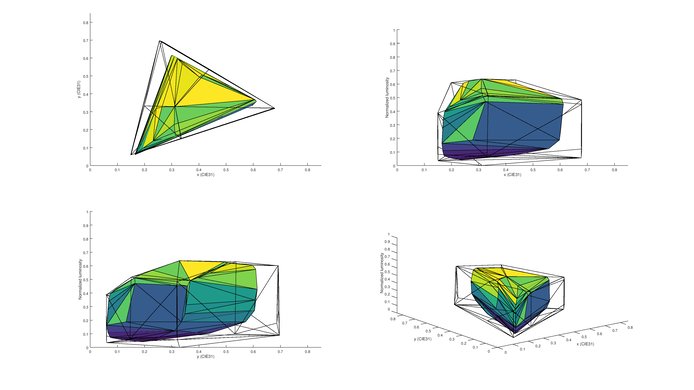
for pictures & test results
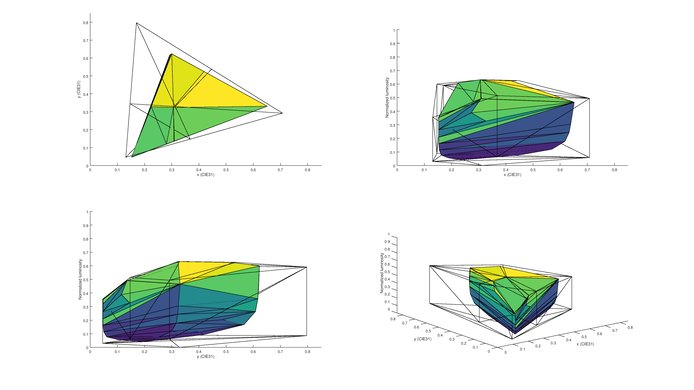
Similar to the other Samsung 6 series TVs, the KU6500 can't produce a wide range of colors for HDR content.
for pictures & test results

for pictures & test results

The TV is average at dealing with reflections. It has a semi-gloss finish which diffuses reflections on the screen. This does make them appear larger, but reduces their intensity. The curve of the TV also distorts the reflections, which can be a good thing depending on where the ambient light is coming from. It is not a problem for a room with some glare but may be an issue in a bright room.

for pictures & test results

for pictures & test results

The response time of the KU6500 results in below average motion blur following moving objects. This is better than most TVs and should be ok for most people, but may be an issue for fast paced content. It is also about the same result as the KU6600 and KU6300 TVs. The PWM flickering of the backlight can be seen in the duplications following our moving logo.
for pictures & test results

for pictures & test results

for pictures & test results

The KU6500 uses PWM to dim the backlight. This can be seen in image duplications following the motion blur moving logo. It is possible to enable black frame insertion to clear up motion, but not when in game mode.
Judder is experienced when watching movies from any source. This is generally not an issue, as most people aren't sensitive to the small 3:2 pulldown judder.
for pictures & test results

The KU6500 has a 60Hz panel which is able to interpolate lower refresh rate content. Those who enjoy the soap opera effect can enable it for a 30 fps input.
The input lag is low across all sources when using the 'Game' picture mode, which is good. Changing the input icon to 'PC' to enable chroma subsampling increases the input lag, but this is still quite a good result. This is similar to other Samsung TVs such as the KU6300.
To accept a high bandwidth signal such as 4k @ 60Hz @ 4:4:4, it is necessary to enable 'HDMI UHD Color'. This is only possible on HDMI1. Change the input label to 'PC' to accurately display chroma subsampling for PC use.

For 5.1 passthrough it is necessary to select the correct format in the sound options (DTS or Dolby Digital). It does not change automatically.
for pictures & test results

Average performance. Frequency response is decent, although at higher volumes pumping and compression will be present. Low-end cutoff is rather poor, even for a TV, but it does get loud enough for most situations.
for pictures & test results

Average harmonic distortion performance. The amount of harmonic distortion produced at lower volumes is decent, however, at higher volumes there is a notifiable increase in distortion, mostly in the mid-range.
for pictures & test results

The Samsung app store provides access to the most popular content such as Netflix, YouTube, Amazon Video and Vudu. In general they work well and are stable.
for pictures & test results

The KU6500 has the newest version of the Tizen operating system. It is one of the most stable smart platforms, which works well for general use. It is more limited in app availability but all the major apps are present and should satisfy most people out there. When connecting a new device via HDMI, the smart interface will set it up automatically, rendering the use pretty easy. Content like pictures and movies store on USB drive can easily be accessed via the USB port.
When a new device is detected (such as when a computer is woken from sleep while plugged into an HDMI port) the TV automatically switches to this device. This may be an annoyance if you are watching other content at the time.
for pictures & test results

The controls are located behind the right hand side of the TV. They are a little bit in from the edge of the TV and so may be a bit difficult to access if the TV is wall mounted.

for pictures & test results

- Manual
- Batteries
- Remote
- Wall mount spacers
- Composite in adapter
- Component in adapter