
Our Verdict
Good TV for a wide range of usages. Movie performance is average. Good picture quality but no local dimming feature to improve dark scene performance. Picture degrades when viewed at an angle.
- Good dark scene performance
- Low input lag
- Picture quality degrades at an angle
- Brighter reflections than average
- Dirty screen effect is visible
Average for movies in a dark room. Picture quality is good, but lacks local dimming to improve dark scene performance. Those sensitive to judder may notice it when playing movies.
Better than average for watching TV in a bright room. Whole screen can get quite bright to overcome glare. Picture quality is good. Reflects more light than most other TVs. Low resolution content looks good. Picture degrades when viewed at an angle.
Better than average for watching sports. Picture quality is good when viewed from in front, but degrades at an angle. Motion blur is average, and some trail may be seen following fast moving objects. Some dirty screen effect is visible.
Great for video games. Input lag is low, which is good. Picture quality is good. Unfortunately motion blur is average, so may be an issue for very fast paced games.
Supports a HDR10 input, but doesn't really benefit from it. Picture quality is good, but can't display a wide range of colors or get very bright.
Supports a HDR10 input, with low input lag which is good. Doesn't support a wider color gamut and can't get bright highlights. Picture quality is good.
Good PC monitor. Displays chroma subsampling correctly for clear text on all backgrounds. Input lag is low. Picture quality is good.
Check Price
Differences Between Sizes And Variants
We tested the 55" (UN55KU6600), version FA01. This is the only size available at the moment.
If someone comes across a different type of panel or if their Samsung KU6600 doesn't correspond to our review, let us know and we will update the review.
| Size | Model |
| 55" | UN55KU6600 |
Popular TV Comparisons

The Samsung KU6600 has good picture quality, but competes in a price range with strong competition. For a mid-range TV it provides a good all-round experience.

We buy and test dozens of TVs yearly, taking an objective, data-driven approach to deliver results you can trust. Our testing process is complex, with hundreds of individual tests that take over a week to complete. Most of our tests use specially designed test patterns that mimic real content, but we also use the same sources you have at home to ensure our results match the real-world experience. We use two main tools for our testing: a Colorimetry Research CR-100 colorimeter and a CR-250 spectroradiometer.
Test Results
Older Test Bench: We tested this product using an older TV test methodology before a major update. Some of the test results below aren't directly comparable with other TVs. Learn more
for pictures & test results

The design is similar to most other Samsung TVs. It has a central stand which looks quite good and works well for those with smaller tables.

for pictures & test results

The back of the TV is corrugated, like the Samsung KU6500. The inputs are located on the right side of the TV.
for pictures & test results

The borders are an average thickness. They have a brushed metal look, which is good.

for pictures & test results

The native contrast ratio is excellent for the KU6600 TV. Blacks look very deep which should provide a very good dark room performance. Dark scene in movies will be especially very nice without too much loss of detail in the very dark scenes.
for videos & test results

The KU6600 doesn't support any local dimming features. The video is for reference only.
Note that on this set, we did notice some dimming occurring automatically. This is due to 'CE Dimming' often found on Samsung TVs, but this is not a local dimming feature. The only way to disable 'CE Dimming' is to put the TV in PC mode.
The peak brightness is average and almost the same in SDR and HDR, which is a good thing for when you watch normal content. Some HDR TVs can only obtain max peak brightness when an HDR signal is detected leaving normal peak brightness much lower.
The peak brightness is average for the KU6600 TV. The smaller size windows peak brightness is relatively lower than the rest of the other test windows. This is due to the strong 'CE dimming' implemented on this TV, making the screen dim a lot when displaying any scene with only a small bright highlight on a generally dark screen.
for pictures & test results

Gray uniformity is average for this Samsung TV. Like many other mid range direct lit LED TVs, the rows of LEDs of the backlight drive can be seen. Both left and right borders of the TV are darker than the center with 3 horizontals bands which are darker that the rest of the screen. Some warmer spots are also visible here and there.
Dirty screen effect is visible and is relatively comparable to what you get on the Samsung KU6300. Sport fans will notice it when watching sports like hockey or football, but during movies or other TV shows, it should still be acceptable.
for videos & test results

Viewing angle is average but is in line with some of the best 2016 Samsung LED TVs. When viewed from the side, the contrast diminishes considerably and the colors lose saturation, leaving the screen looking much darker than when it is when viewed front straight on.
Update: We have changed the methodology of testing. Since this is an old TV which we don't have anymore, we extrapolated the results.
for pictures & test results

Black uniformity is also very good on this set. When looking at our test picture, some faint clouding can be seen in the top left part of the screen, but this is the only moment that we could really notice this. No clouding could be seen while watching normal content nor even when looking at our test image.
for pictures & test results

The KU6600 can display our test image without too many problems and without any gradation marks normally seen on an 8 bit panel. Like the Samsung KU6300, there are some little imperfections in the darker shades and especially in the green, but nothing that would really be noticeable when watching normal content.
for pictures & test results

for pictures & test results

for pictures & test results

Prior to calibration the results are quite good. The white balance is a little bit too warm, but for most people a calibration is not necessary.
for pictures & test results

for pictures & test results

for pictures & test results

Calibration is relatively easy. The white balance isn't as responsive as some other Samsung TVs but provided good results. You can see our recommended settings here.
for pictures & test results

Upscaling of low quality content such as DVDs is good. Details are preserved well.
for pictures & test results

720p content looks good once upscaled. Image remains clear. Some halo artifacts can be seen.
for pictures & test results

1080p content such as Blu-rays look good. The image remains clear.

for pictures & test results

Doesn't support a wide color gamut. This test was performed with a HDR10 signal. This result is good enough for Rec. 709 content, but will not display an increased range of colors for HDR.
for pictures & test results
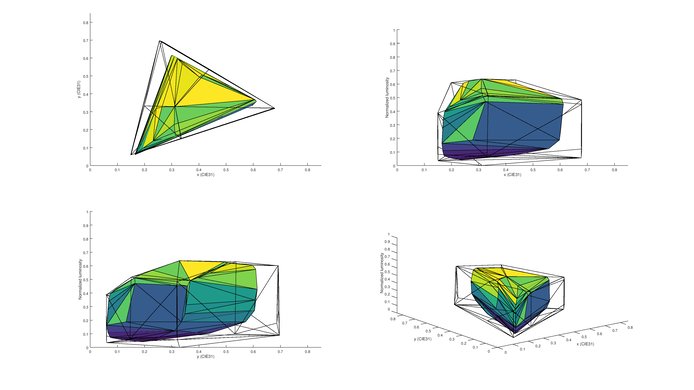
for pictures & test results
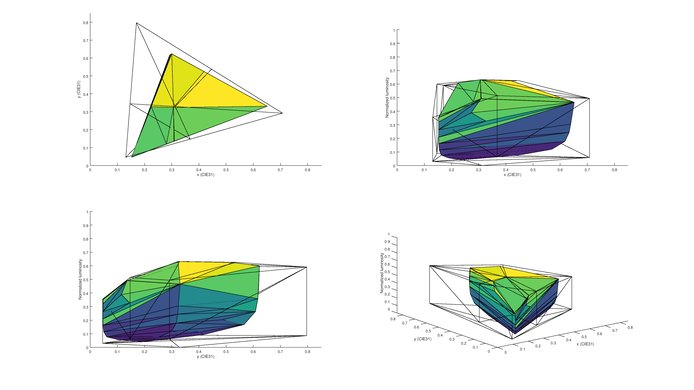
Similar performance to other TVs without wide color gamut support, such as the KU6300. Fine for SDR content but can't produce a wide range of colors for HDR.
for pictures & test results

for pictures & test results

The TV has a semi-gloss finish. This helps to diffuse direct reflections across the screen, making them less intense. It is more reflective than most other TVs, and is better suited to a room without too much direct light.

for pictures & test results

for pictures & test results

The motion performance of the KU6600 is average. Some motion blur can be noticed following moving objects. For most people this won't be an issue, but may be distracting for fast paced content. The backlight uses PWM flickering to dim below about 50%. This can be seen in the repetitions following the logo. This is a bit worse than the similar model KU6300.
for pictures & test results

for pictures & test results

for pictures & test results

The KU6600 uses PWM at 120Hz to dim the backlight. It is also possible to enable black frame insertion to clear up moving images, but this produces a visible flicker. Unfortunately this isn't available when in game mode.
Movies from any source play with some judder. Most people aren't sensitive to it, so this isn't an issue.
for pictures & test results

The KU6600 has a 60Hz panel, which is able to interpolate lower refresh rate content for those who enjoy the soap opera effect.
Input lag is low, which is good. For best results, use the 'Game' viewing mode. With the PC icon selected for chroma subsampling support the input lag is slightly higher, but still quite good.
To enable support for higher bandwidth resolutions, activate 'HDMI UHD Color' from the picture menu. This is only possible on HDMI 1. To display chroma subsampling correctly, label the HDMI input to 'PC'.

HDR Blu-rays play through all HDMI ports on the TV, but some 8 bit gradations can be seen when using HDMI 2 or HDMI 3.
The TV supports 5.1 passthrough for Dolby Digital and DTS, but it is necessary to select the correct audio type in the sound settings, since it doesn't change automatically.
for pictures & test results

Average performance. Frequency response is decent at lower volumes, but pumping and compression will be present at higher volumes. Maximum loudness is pretty good at 90.1dB but low-frequency extension of 142Hz is poor, even for a TV.
for pictures & test results

Average harmonic distortion performance. The amount of harmonic distortion produced at 75dB and 85dB is quite decent. However, there is a significant jump in distortion at maximum volume, mostly in the Mid Range.
for pictures & test results

The app store provides access to a wide range of content, including Youtube, Netflix and Amazon Video. In general the apps work well and are smooth.
for pictures & test results

The KU6600 has the newest version of Samsung Tizen smart platform. It works well and is improving in speed and stability each year. It isn't the best looking offering, but is intuitive to use and provides a wide range of apps and features. Netflix, Amazon Video, Hulu and YouTube are all available, with many more downloadable from the app store. The TV features device discovery for CEC, allowing it to easily and automatically interface with connected devices. It is also possible to play files directly from a USB.
When a new device is detected (such as when a computer is woken from sleep while plugged into an HDMI port) the TV automatically switches to this device. This may be an annoyance if you are watching other content at the time.
for pictures & test results

The controls are located behind the right hand side of the TV. Due to their location quite far from the edge they may be a little bit more difficult to access if wall mounted.

for pictures & test results

- Manual
- Batteries
- Remote
- Component adapter
- Composite adapter
- Wall mount spacers