
A 240Hz monitor is beneficial for competitive gaming as it can provide a better gaming experience with a smoother feel in action games than lower-refresh-rate displays. These models are available in various resolutions, from 1080p to 4k, and at different price points, so they're accessible for any budget.
There are a few factors to think about when looking for a gaming monitor. For example, it's important to consider what type of computer setup you have. If you have a high-end graphics card that maintains 240 fps with a high resolution, you'd benefit from a 1440p or 4k monitor. However, if you have a budget setup, then a lower-cost 1080p monitor is better, as it's easier for your PC to maintain high frame rates. The monitor's response time is another consideration for sharp motion, especially with fast-moving objects. You'll also want it to have low input lag for a responsive feel, but most monitors have that. Besides that, most modern displays support any type of VRR format to reduce screen tearing with various graphics cards. You may even want to think about its picture quality if you play games in HDR, where deep blacks and bright highlights deliver an impressive viewing experience.
We've bought and tested more than 405 monitors, and below are our recommendations for the best 240Hz monitors available. Check out our recommendations for the best G-SYNC monitors, the best high refresh rate monitors, and, if you prefer looking for something with a lower refresh rate, the best 144Hz monitors.
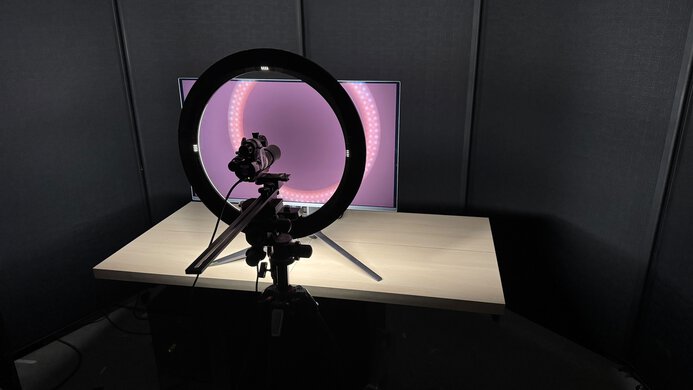
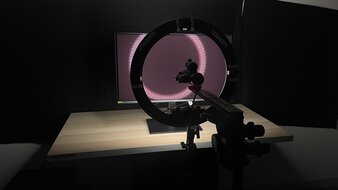
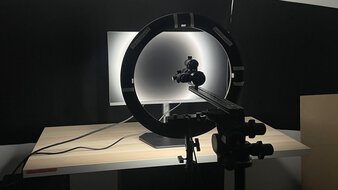
We buy and test more than 30 monitors each year, all of which we purchase ourselves, without cherry-picked units or samples. We put a lot into each unbiased, straight-to-the-point review, and there's a whole process from purchasing to publishing, involving multiple teams and people. We do more than just use the monitor for a week; we use specialized, custom tools to measure various aspects and deliver objective, data-driven results. We also consider multiple factors before making any recommendations, including the monitor's cost, its performance compared to the competition, and whether it's easy to find.
-
Best 240Hz Monitor
 PC GamingResponse TimeHDR PictureSDR PictureBrightnessSize32"Panel TypeOLEDSub-TypeQD-OLEDNative Refresh RateHzMax Refresh Rate240 HzSee all our test resultsNative Resolution3840 x 2160
The best 240Hz gaming monitor we've tested is the ASUS ROG Swift OLED PG32UCDM Gen3. It offers high-end performance and outstanding picture quality. You need a premium setup to take advantage of its 240Hz refresh rate with a 4k resolution. However, what makes this such an amazing gaming monitor is its near-instantaneous response time, which results in minimal motion blur with fast-moving objects. It also supports both HDMI 2.1 and DisplayPort 2.1 bandwidth to take full advantage of modern graphics cards and consoles.
Besides that, its Tandem QD-OLED panel delivers deep blacks in dark rooms without any haloing against dark backgrounds, but the black levels rise in bright rooms, making them look gray. On the plus side, it gets bright enough for colors to look vivid and highlights to pop, making for a fantastic HDR gaming experience. Its high resolution also results in detailed images, and its 32-inch screen provides an immersive gaming experience. However, you may prefer the smaller ASUS ROG Swift OLED PG27UCDM if you want a 27-inch option at a lower cost, but it doesn't get as bright as the PG32UCDM Gen3.
-
Best Upper Mid-Range 240Hz Monitor
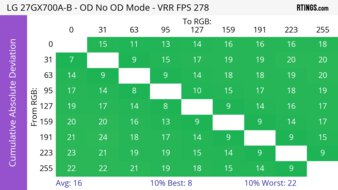
PC GamingResponse TimeHDR PictureSDR PictureBrightnessSize27"Panel TypeOLEDSub-TypeWOLEDNative Refresh RateHzMax Refresh Rate280 HzSee all our test resultsNative Resolution2560 x 1440If you find the ASUS ROG Swift OLED PG32UCDM Gen3 too expensive, consider the lower-cost LG 27GX700A-B instead. There are a few trade-offs to getting it over the ASUS. Although it gets brighter in HDR, it's less accurate as it prioritizes brightness over accuracy. If you care about using a more accurate mode, then it's dimmer, so you have to choose between brightness and accuracy. Its colors aren't as vivid as on the ASUS either. It also lacks a few features that the ASUS has, like DisplayPort 2.1 bandwidth, which is something to consider if you have a high-end DP 2.1 graphics card. That said, with a lower resolution, images aren't as detailed. However, it supports enough bandwidth that your graphics card won't need to use compression to reach 240Hz over DisplayPort, avoiding any compression-related issues.
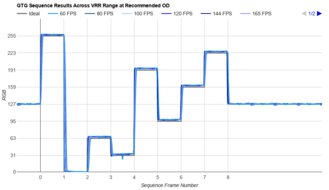
This lower 1440p resolution makes it the best 1440p 240Hz monitor. Although it has a native 280Hz refresh rate, it still performs very well at 240Hz. This is because it has a near-instantaneous response time at any refresh rate, so motion looks sharp, and it has low input lag as well. One difference is that this monitor has a matte coating, which has better reflection handling than the glossy coating of the ASUS. The downside is that images are less clear on the LG. You may prefer the ASUS ROG Strix OLED XG27AQWMG if you want a similar glossy option, but it costs more than the LG.
-
Best Mid-Range 240Hz Monitor
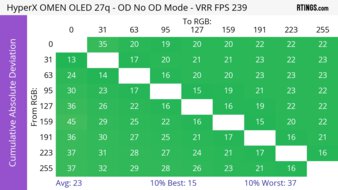
PC GamingResponse TimeHDR PictureSDR PictureBrightnessSize27"Panel TypeOLEDSub-TypeQD-OLEDNative Refresh RateHzMax Refresh Rate240 HzSee all our test resultsNative Resolution2560 x 1440If you find the LG 27GX700A-B too expensive for your needs, the HyperX OMEN OLED 27q is a solid alternative that offers good value. It's another OLED, but there are some notable differences compared to the LG. For example, it has a QD-OLED panel that doesn't get as bright as the Tandem OLED panel of the LG. On top of the fact that it has raised black levels in bright rooms, making them look purple, this means the monitor is worse to use in a well-lit environment. Its colors aren't as vivid, either, because it fails to make the brightest colors pop, which is something to consider if you want to get it for HDR gaming. It still looks fantastic in HDR, though it just isn't the best around.
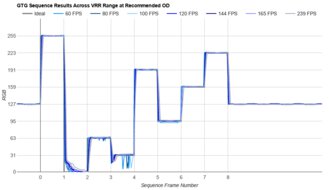
This monitor offers many of the benefits of any OLED, including deep blacks in dark rooms, no haloing around bright objects, and highlights that pop against the rest of the image. It also has incredible motion handling with sharp motion at any refresh rate, including up to its max of 240Hz. Lastly, it supports 240Hz, 8-bit signals without any compression over DisplayPort and HDMI, thanks to its HDMI 2.1 bandwidth, and it performs similarly for gaming as the LG. You may also want to check out the Dell Alienware AW2726DM if you can find it for cheaper. However, the Dell lacks HDMI 2.1 bandwidth, so you can only get a 240Hz signal over DisplayPort.
-
Best Budget 240Hz Monitor
PC GamingResponse TimeHDR PictureSDR PictureBrightnessSize27"Panel TypeLCDSub-TypeIPSNative Refresh RateHzMax Refresh Rate240 HzSee all our test resultsNative Resolution2560 x 1440Should the HyperX OMEN OLED 27q still be out of your budget, there are some great models you can get for a lower cost without an OLED panel. If that's what you're interested in, look into the LG 27GR83Q-B. The biggest trade-off is that it has worse picture quality than the HyperX, with blacks that look gray and highlights that are muted, meaning it's much worse for HDR gaming. It also has more motion blur than the HyperX, but it has a consistently fast response time at any refresh rate, so fast-moving content looks good regardless.
Like the HyperX, this monitor supports HDMI 2.1 bandwidth, so you can reach its max refresh rate over an HDMI connection, besides being able to reach it over DisplayPort. Although it doesn't have many extra features, it has typical gaming perks, like a virtual crosshair that your game's anti-cheat tool won't detect. Plus, it gets brighter than the HyperX, so it's a better choice for gaming in well-lit rooms.
-
Best Cheap 240Hz Monitor
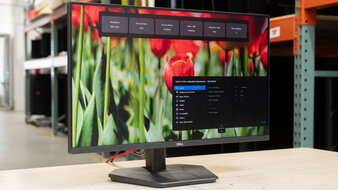
PC GamingResponse TimeHDR PictureSDR PictureBrightnessSize24"Panel TypeLCDSub-TypeIPSNative Refresh RateHzMax Refresh Rate240 HzSee all our test resultsNative Resolution1920 x 1080If you want the best 240Hz gaming monitor at a low cost, check out the Dell SE2426HGS instead. It's a basic 1080p, 240Hz model that doesn't cost a lot, which helps if you're looking for a cheap option. You lose out on a few features as you move down in price categories; in this case, it has a lower resolution than the LG 27GR83Q-B, so it doesn't deliver the same level of detail. However, with its lower resolution, your graphics card can maintain a 240 fps frame rate more easily. It also has a smaller 24-inch screen, so gaming doesn't feel as immersive, but it's still fine for solo gaming.
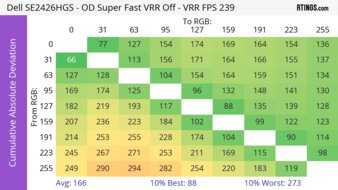
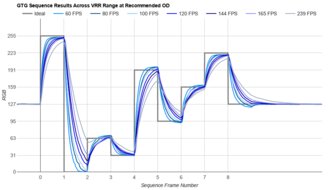
This monitor stands out against other low-cost displays because it has consistently good motion handling at any refresh rate. There's minimal motion blur with fast-moving objects. Unfortunately, though, it doesn't get as bright as the LG, and it fails to display a wide range of colors in HDR, so it has limited picture quality. That said, this is what you have to expect from such a cheap display.






Notable Mentions
-
Samsung Odyssey OLED G80SH S32HG802S:
The Samsung Odyssey OLED G80SH S32HG802S is a high-end 4k, 240Hz QD-OLED that competes directly with the ASUS ROG Swift OLED PG32UCDM Gen3. The main difference is that the Samsung has a matte coating for better reflection handling than the ASUS. However, that means images aren't as clear on the Samsung.
See our review -
Dell Alienware AW3426DW:
The Dell Alienware AW3426DW is a fantastic ultrawide gaming monitor with more horizontal screen space than the ASUS ROG Swift OLED PG32UCDM Gen3. It's a great choice for immersive gaming. However, the Dell has a lower resolution, so images aren't as detailed.
See our review -
Dell Alienware AW2725Q:
The Dell Alienware AW2725Q is a 27-inch, 4k QD-OLED that's a cheaper and smaller alternative to the ASUS ROG Swift OLED PG32UCDM Gen3. It performs similarly for the most part, but it doesn't get as bright, and it lacks some features, like DisplayPort 2.1 bandwidth.
See our review -
Gigabyte MO27Q28G:
The Gigabyte MO27Q28G is an upper mid-range gaming monitor with the same Tandem OLED panel as the LG 27GX700A-B. While the Gigabyte is more accurate in HDR, it can be harder to find.
See our review -
LG 27GX704A-B:
The LG 27GX704A-B is a mid-range 240Hz gaming monitor with an OLED panel, competing with the HyperX OMEN OLED 27q. The LG is the better choice if you game in well-lit rooms, as its blacks don't look purple. However, its colors aren't as vivid as on the HyperX, and it sometimes costs more.
See our review
Recent Updates
Aug 26, 2026:
We replaced the ASUS ROG Swift OLED PG27UCDM with the newer and brighter ASUS ROG Swift OLED PG32UCDM Gen3. We also removed the Dell Alienware AW2726DM from the lower mid-range category because it's priced close to the HyperX OMEN OLED 27q. In the Notable Mentions, we removed the ASUS ROG Strix OLED XG32UCWMG, and we added the Samsung Odyssey OLED G80SH S32HG802S and the Dell Alienware AW3426DW.
Jul 03, 2026:
We renamed the LG 27GR83Q-B and the Dell SE2426HGS to the 'Best Budget 240Hz Monitor' and the 'Best Cheap 240Hz Monitor,' respectively, to better reflect their current positions in the market. We also added the Dell Alienware AW2726DM as the 'Best Lower Mid-Range 240Hz Monitor.' In the Notable Mentions, we added the LG 27GX704A-B.
May 19, 2026:
We replaced the ASUS ROG Swift PG279QM with the HyperX OMEN OLED 27q, which has better picture quality and motion handling. We also replaced the ViewSonic XG2431, which is hard to find, with the Dell SE2426HGS. In the Notable Mentions, we replaced the Dell Alienware AW2723DF with the Dell Alienware AW2726DM.
Mar 26, 2026:
We replaced the Dell Alienware AW3425DW and the ASUS ROG Strix OLED XG27AQDMG with the ASUS ROG Strix OLED XG32UCWMG and the ASUS ROG Strix OLED XG27AQWMG, respectively, in the Notable Mentions.
Feb 06, 2026:
We replaced the Dell G2524H with the Gigabyte MO27Q28G in the Notable Mentions.
All Reviews
Our recommendations are based on what we think are the best 240Hz monitors that are currently available in the United States. They're adapted to be valid for most people in each price range. The rating is based on our review, feedback from visitors, and price. For example, two monitors may perform the same, but the cheaper one will be recommended. We also consider availability, as we don't recommend a monitor that's hard to find.
If you'd prefer to make your own decision, here's the list of all of our reviews of monitors with a native 240Hz refresh rate. Be careful not to get too caught up in the details. Most monitors are good enough to please most people, and the things we fault monitors on are often not noticeable unless you really look for them.