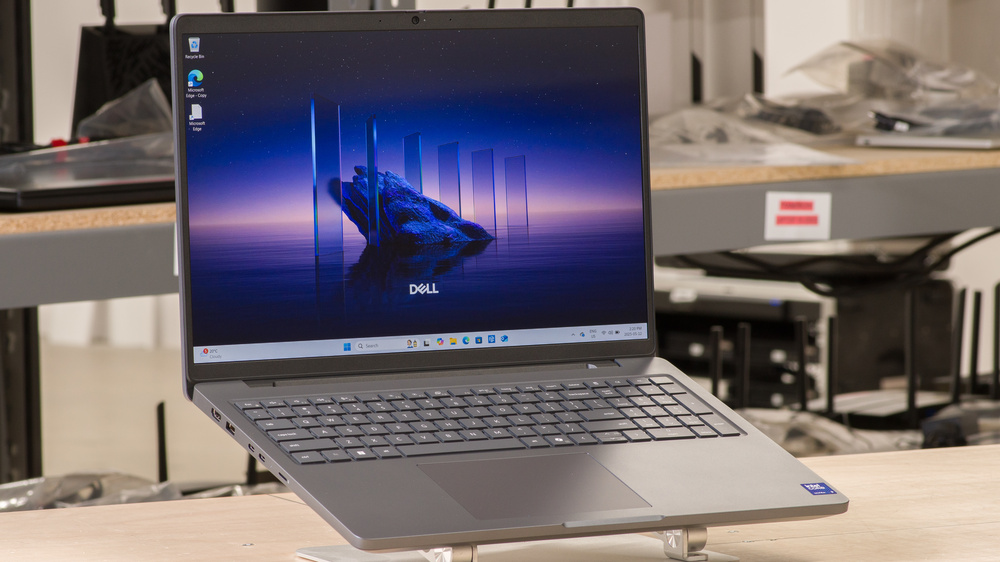
The Dell Pro Max 16 (2025) is a 16-inch workstation laptop. This 'Base' model (MC16250) is the entry-level tier in Dell's Pro Max 16 lineup (see here for more information about Dell's rebranding), replacing the Dell Precision 3000 line under the old naming scheme. It's available with Intel Arrow Lake CPUs up to a Core Ultra 9 285H, paired with integrated graphics or an NVIDIA discrete GPU (Blackwell generation). Memory and storage max out at 64GB and 2TB, respectively. You can get this laptop with an FHD+ (with or without touch input) or QHD+ display and a Wi-Fi 6E or 7 wireless adapter. Keyboard backlighting, cellular connectivity, and biometrics (fingerprint sensor or facial recognition IR camera) are optional features. Ports include two 5Gbps USB-A ports, two USB-C/Thunderbolt 4 ports, an HDMI 2.0 port, a 1Gbps Ethernet port, a MicroSD card reader, and a 3.5 mm headphone jack.
See our unit's specifications and the available configuration options in the Differences Between Variants section.
Our Verdict
The Dell Pro Max 16 is okay for general productivity. Its Intel Arrow Lake CPUs can easily handle general productivity tasks like text processing, spreadsheets, and presentations. The overall user experience is okay; its 16-inch display provides plenty of space for multitasking, and the keyboard feels fairly comfortable to type on. The layout may take some getting used to, and it lacks backlighting. This is also a bulky laptop that's hard to carry around. Also, at nine hours of light use, the battery might not last through a typical work or school day, depending on your workload.
Large screen for multitasking.
Wide port selection.
Optional cellular connectivity.
Bulky, heavy design.
Battery might not last through a typical day, depending on your workload.
The Dell Pro Max 16 is decent for media consumption. While its video playback battery life is pretty good at around 7 hours, this is a bulky and heavy device that's hard to carry around. Its FHD+ display looks washed out due to its narrow color gamut, though you can get the laptop with a QHD+ panel, which looks sharper and more colorful. As for the speakers, they get pretty loud with minimal compression but sound unnatural and hollow, with almost no bass.
7-hour local video playback battery life.
Loud speakers.
QHD+ display option.
Bulky, heavy design.
FHD+ screens look washed out.
Blacks look gray in dim settings.
Speakers sound unnatural and hollow, with no bass.
The Dell Pro Max 16 is sub-par for gaming. While the models with integrated graphics don't handle AAA games well, this laptop is available with high-performance Intel CPUs and NVIDIA discrete GPUs, which can handle higher-end games better. That said, performance will vary depending on the title, as the NVIDIA professional GPUs don't always have the best game drivers. You can get this laptop with a 120Hz display, but it's unclear how the panel performs, and there's no VRR support to reduce screen tearing. Thermal throttling is minimal, though the fans get pretty loud at full speed.
CPU and discrete GPU can handle demanding workloads.
User-replaceable RAM and storage.
Minimal thermal throttling.
Only available with slow 60Hz displays.
No VRR support to reduce screen tearing.
Loud fans.
Models with integrated graphics don't handle gaming well.
The Dell Pro Max 16 is a decent workstation laptop. It's available with Intel Arrow Lake CPUs and discrete NVIDIA GPUs, which are powerful enough to handle demanding workloads, AI development, and LLMs, but struggle with 3D animations. RAM and storage are user-replaceable, so you can easily add or upgrade later. The excellent port selection includes Thunderbolt 4s, an HDMI, and a gigabit Ethernet port, allowing you to quickly transfer files, locally or online, and connect multiple external displays. You can do some color-critical work like photo and video editing, but only if you get the QHD+ panel and work exclusively in the sRGB color space.
CPU and discrete GPU can handle demanding workloads.
User-replaceable RAM and storage.
Wide port selection.
Minimal thermal throttling.
Display isn't suitable for color-critical work.
Loud fans.
Changelog
- Updated Apr 09, 2026: We've updated this review to Test Bench 0.9.1! This update changes the way we score the 'Out-Of-The-Box Color Accuracy' box. Read the changelog for more info.
-
Updated Jan 23, 2026:
We've updated text throughout the review after converting to Test Bench 0.9.
- Updated Jan 23, 2026: We've updated the review to Test Bench 0.9, which adds several test boxes in the performance section, including CPU/RAM Performance, Low Tier Graphics, High Tier Graphics, Professional 3D (GPU accelerated), CPU-Intensive Game Performance, GPU-Intensive Game Performance, and Ray Tracing Performance. See the 0.9 changelog here.
-
Updated Aug 19, 2025:
We've updated the review to add the NVIDIA RTX PRO 1000's TGP in the Differences Between Variants and GPU sections.
Check Price
Differences Between Sizes And Variants
We tested the Dell Pro Max 16 Base (model MC16250) with a non-touch FHD+ display, an Intel Core Ultra 9 285H CPU, integrated graphics, 32GB of RAM, and 256GB of storage. The display, CPU, memory, and storage are configurable; the available options are below.
SCREEN
- 16" IPS 1920 x 1200 60Hz (matte, 45% NTSC, 300 cd/m²)
- 16" IPS 1920 x 1200 60Hz (touchscreen, matte, 45% NTSC, 300 cd/m²)
- 16" IPS 2560 x 1600 120Hz (matte, 100% sRGB, 300 cd/m²)
CPU
- Intel Core Ultra 5 235H vPro (14 cores/14 threads, up to 5.0GHz, 18MB cache)
- Intel Core Ultra 7 255H (16 cores/16 threads, up to 5.10GHz, 24MB cache)
- Intel Core Ultra 7 265H vPro (16 cores/16 threads, up to 5.30GHz, 24MB cache)
- Intel Core Ultra 9 285H vPro (16 cores/16 threads, up to 5.40GHz, 24MB cache)
GPU
- Intel Arc 140T (integrated)
- NVIDIA RTX PRO 500 6GB GDDR7 (discrete, unknown TGP)
- NVIDIA RTX PRO 1000 8GB GDDR7 (discrete, 65W TGP)
- NVIDIA RTX PRO 2000 8GB GDDR7 (discrete, unknown TGP)
MEMORY
- 16GB DDR5 5600MHz non-ECC
- 32GB DDR5 5600MHz non-ECC
- 32GB DDR5 6400MHz non-ECC
- 64GB DDR5 6400MHz non-ECC
STORAGE
- 256GB M.2 2230 PCIe Gen 4 NVMe SSD
- 512GB M.2 2230 PCIe Gen 4 NVMe SSD
- 1TB M.2 2280 PCIe Gen 4 NVMe SSD
- 2TB M.2 2280 PCIe Gen 4 NVMe SSD
Color
- Magnetite
Popular Laptop Comparisons
The Dell Pro Max 16 is an excellent workstation laptop if performance is your top priority, as it delivers ample processing power to handle demanding tasks. As for the overall user experience, while we expect some compromises for an entry-level model like this, it's still rather disappointing given the price. You can easily get a laptop with a significantly more premium build, a higher-quality display, a more comfortable keyboard, and better-sounding speakers at around the same price, like the Apple MacBook Pro 14 (2024) with an M4 Pro chip. Some gaming laptops can also provide similar performance and a far better user experience, like the ASUS ROG Zephyrus G16 (2024) GU605.
For more options, check out our recommendations for the best workstation laptops, the best laptops for programming, and the best 15-16-inch laptops.
The Lenovo ThinkPad P16 Gen 2 (2024) is better than the Dell Pro Max 16 (2025). Although the Lenovo uses older-generation components (Intel 14th Gen and NVIDIA Ada Generation), it can still provide more performance if you get a higher-end model with an Intel Core i7-14700HX and RTX4000/5000 discrete GPU. The Lenovo also has a more comfortable keyboard and higher-quality display options, including two 4k panels (IPS and OLED) with full P3 coverage.
The Apple MacBook Pro 16 (M4, 2024) is much better than the Dell Pro Max 16 (2025). Not only can you get more performance from the MacBook Pro, but you also get a far superior user experience, thanks to its more premium build, well-calibrated Mini LED display, more tactile keyboard, larger haptic touchpad, and better-sounding speakers. The MacBook Pro is also a better option for on-the-go use, as it has a more compact design and significantly longer battery life.
The Lenovo ThinkPad P1 Gen 7 (2024) is better than the Dell Pro Max 16 (2025). The performance is pretty close between these two laptops—it just depends on the configuration. What makes the Lenovo better is the user experience; it has a more premium build, a significantly better keyboard and touchpad, and higher-quality display options, including a 165Hz QHD+ and a 4k+ OLED panel, with the latter boasting full P3 coverage. The Lenovo also has a more compact design and longer battery life, making it a superior option for on-the-go use.
The Dell Pro Max 16 (2025) is marginally better than the Dell Precision 3591 (2024). The Pro Max 16 has a sturdier build and provides a slightly better user experience with a larger, more responsive touchpad and a more comfortable keyboard. It also has higher-quality display options, including a 120Hz QHD+ panel. Performance will depend on the configuration, though generally speaking, you'll get slightly more out of the Pro Max 16, as it uses newer Intel Arrow Lake CPUs and NVIDIA Blackwell generation GPUs.
Test Results



for pictures & test results

for pictures & test results


for pictures & test results
















for pictures & test results

for videos & test results

for pictures & test results

for pictures & test results

for pictures & test results
