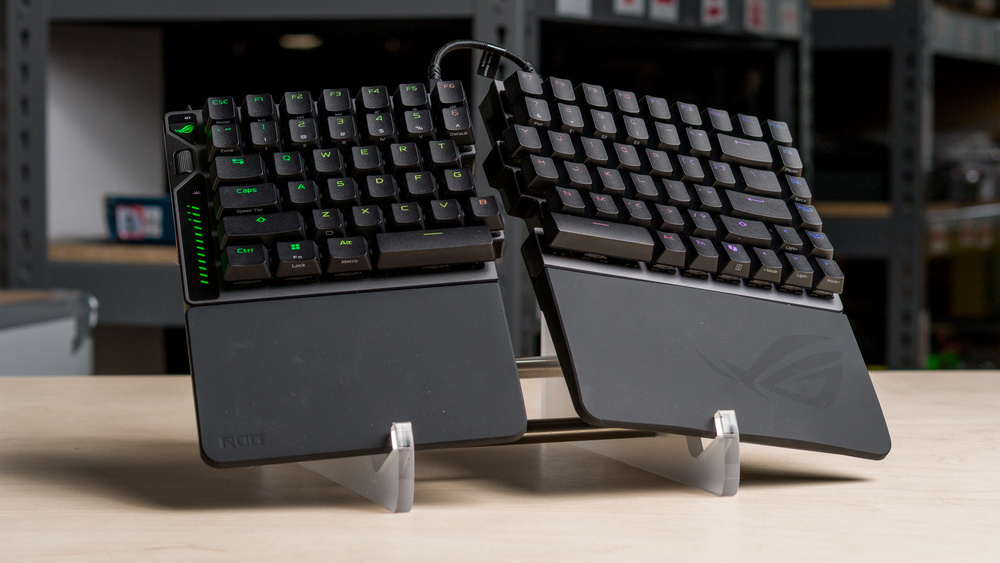
The ASUS ROG Falcata is a split gaming keyboard with magnetic switches. It connects wirelessly over 2.4GHz or Bluetooth, and you can use the left half on its own without a cable, which can be useful for games where you only need inputs on the left side of the board, such as FPS titles. However, the two halves don't communicate wirelessly, so if you want to use both halves separately, they need to remain connected via one of the included proprietary link cables. The keyboard also comes with two silicone wrist rest pads and screw-in feet for tilt or tenting adjustments. You can adjust actuation and backlight settings directly on the keyboard or use its web-based software for more in-depth customization.
Our Verdict
The ASUS ROG Falcata is a remarkable gaming keyboard. It has excellent build quality, full RGB backlighting, and outstanding wired latency performance. Its robust web-based software lets you adjust a wide range of actuation settings, including more advanced options such as Rapid Trigger, SOCD, DKS, and others, primarily focused on specific gaming scenarios for high-level competitive play. Its ergonomic features also help it stand out against many similar gaming keyboards, with a true split design and basic tenting support. Unfortunately, its wireless latency performance is higher, making wireless use somewhat less suitable for competitive play. Also, only the left half can be used truly wirelessly. If you want to use both halves of the keyboard simultaneously, they need to be connected with a proprietary link cable.
Excellent build quality.
Exceptionally low and consistent single-key and multi-key latency over a wired connection.
RGB backlighting with clear shine-through legends.
True split design with wrist rests and basic tenting options.
Can use the left side fully wirelessly on its own.
Wireless latency is good, but the gap between wireless and wired latency is larger than usual.
Left half works fully wirelessly on its own, but using both halves requires a proprietary link cable between them.
Though it's designed primarily with gaming in mind, the ASUS ROG Falcata is excellent for office work. It has robust build quality and connects wirelessly via a 2.4GHz receiver or Bluetooth, with support for multi-device pairing. That said, to use both halves at the same time, you need to keep them connected with a physical link cable, which somewhat limits how far apart you can place each half. That said, the other ergonomic features, including the wrist rests and adjustable tilt and tenting feet, can help make typing for longer periods less strenuous. Typing noise is also on the quieter side, though unfortunately, there's a small degree of stabilizer rattle, which is the only real weakness to the otherwise excellent typing quality.
Excellent build quality.
True split design with wrist rests and basic tenting options.
Connects wirelessly with 2.4GHz receiver or Bluetooth.
Left half works fully wirelessly on its own, but using both halves requires a proprietary link cable between them.
The ASUS ROG Falcata is decent for tablet and mobile use. It has excellent build quality and connects wirelessly over Bluetooth, with support for multi-device pairing. That said, only the left half works completely wirelessly, as you need to connect both halves with one of the included link cables to use them simultaneously. The keyboard is also somewhat unwieldy, especially with the wrist rests installed, as they're fairly heavy and add considerable front-to-back depth. Overall, this keyboard is better suited to a stationary setup than a portable one.
Connects wirelessly with 2.4GHz receiver or Bluetooth.
Can use the left side fully wirelessly on its own.
Somewhat heavy, bulky, and awkward to use wirelessly with the link cable.
The ASUS ROG Falcata is amazing for programming. It has excellent build quality and typing quality. It also connects wirelessly and supports multi-device pairing over Bluetooth. However, the two halves of the keyboard can't communicate with each other wirelessly, so using them together requires connecting them with a fairly short link cable, which limits placement flexibility somewhat. That said, the included wrist rests and screw-in feet for tenting and tilt can provide some ergonomic benefits, especially during longer work sessions. It also has full RGB backlighting and clear shine-through legends, which are useful if you prefer working in lower light.
Excellent build quality.
RGB backlighting with clear shine-through legends.
True split design with wrist rests and basic tenting options.
Connects wirelessly with 2.4GHz receiver or Bluetooth.
Left half works fully wirelessly on its own, but using both halves requires a proprietary link cable between them.
The ASUS ROG Falcata is okay for use with an entertainment or home theater setup. It has excellent build quality and connects wirelessly over Bluetooth or with its 2.4GHz USB receiver. That said, only the left half works completely wirelessly on its own. If you want to use both halves while connected wirelessly to your device, the halves still need to be joined with one of the included link cables, which limits placement flexibility. Using both halves is also likely to be unwieldy from a couch unless you have a desk or table nearby. It lacks a full set of dedicated media keys, though it does have media hotkeys and playback controls through the programmable wheel on the left side. It also has full RGB backlighting with clear shine-through legends that are easy to read in the dark.
RGB backlighting with clear shine-through legends.
Connects wirelessly with 2.4GHz receiver or Bluetooth.
Left half works fully wirelessly on its own, but using both halves requires a proprietary link cable between them.
Somewhat heavy, bulky, and awkward to use wirelessly with the link cable.
The ASUS ROG Falcata delivers exceptional raw performance over a wired connection, with extremely low and consistent single-key and multi-key latency, making it more than suitable for competitive gaming in any genre. Its wireless latency is by no means bad, and it's likely still low enough that most people won't notice it in-game. However, it approaches the upper limit of what we'd recommend for high-level competitive players. For the best possible performance, use this keyboard in wired mode.
Exceptionally low and consistent single-key and multi-key latency over a wired connection.
Wireless latency is good, but the gap between wireless and wired latency is larger than usual.
Check Price
Differences Between Sizes And Variants
The ASUS ROG Falcata has no variants or purchase options, though some retailers list this keyboard as the ASUS M703 ROG Falcata instead of the ASUS ROG Falcata. See a photo of our unit's label.
Popular Keyboard Comparisons
The ASUS ROG Falcata is a magnetic gaming keyboard that delivers competitive gaming performance in line with other high-end adjustable-actuation options, such as the Wooting 80HE and Razer Huntsman V3 Pro 8KHz. At full retail price, the Falcata is significantly more expensive than these options, but it stands out due to its wireless connectivity and ergonomic features, including a true split design and basic tenting. Most other keyboards with this level of gaming performance have conventional straight designs with only basic incline settings.
That said, while the Falcata's ergonomic features stand out compared to other high-performance gaming keyboards, its ergonomic flexibility is still fairly limited compared to dedicated ergonomic keyboards like the MoErgo Glove80 or Dygma Raise 2. These keyboards have conventional mechanical switches, so they don't offer adjustable actuation features like Rapid Trigger or SOCD. However, they still perform quite well for most competitive gaming and offer more substantial ergonomic features, such as thumb clusters, more flexible tenting options, and more flexible wireless placement without a link cable. In the case of the Glove80, you also get concave key wells and a columnar key layout. The Falcata is an outstanding but expensive option if you want a magnetic keyboard for competitive gaming with some ergonomic features. However, it may be disappointing if you're looking for more extensive ergonomic features.
For more recommendations, see our picks for the best ergonomic keyboards, the best wireless keyboards, and the best gaming keyboards.
The Wooting 80HE and ASUS ROG Falcata are gaming keyboards with magnetic switches. Both have exceptional latency performance geared toward competitive players. The major difference between them is that the Wooting is wired-only and has a comparatively more conventional TKL 80% design, while the Falcata has wireless connectivity and an ergonomic 75% design that lets you separate both halves of the keyboard to encourage a more neutral shoulder width. It also includes wrist rests for each half and adjustable feet that provide basic positive and negative incline and tenting options.
The ASUS ROG Azoth Extreme and ASUS ROG Falcata are wireless 75% gaming keyboards, but they have quite different feature sets. The Azoth Extreme uses mechanical switches and offers slightly better typing quality. It’s also a bit quieter and has a customizable OLED screen, which the Falcata lacks. The Falcata, on the other hand, uses magnetic switches, giving you access to adjustable actuation and advanced gaming features like Rapid Trigger. It also has slightly better raw performance and a more ergonomic design, with a split construction that lets you separate the keyboard into two halves connected by a link cable. Additionally, it includes wrist rests for each half and screw-in feet for adjusting tilt and tenting angle.
The MoErgo Glove80 and ASUS ROG Falcata are wireless keyboards with ergonomic designs. The MoErgo uses mechanical switches and has much more extensive ergonomic features, including a fully wireless split design, concave key wells, a columnar layout, thumb clusters, integrated wrist rests, and highly customizable tenting angles. The Falcata is more clearly designed for competitive gaming. It uses magnetic switches, giving you access to adjustable actuation and advanced gaming features like Rapid Trigger. That said, its ergonomic features are more basic. It has a split design, wrist rests, and basic tenting adjustment, but it doesn't offer a fully wireless split setup. Only the left half can be used wirelessly on its own, and when you use the keyboard in split mode, the two halves need to stay connected with the proprietary link cable.
The Dygma Raise 2 and ASUS ROG Falcata are wireless keyboards with ergonomic designs. The Dygma has more in-depth ergonomic features, though some are sold separately. It comes standard with a fully wireless split design, integrated wrist rests, and thumb clusters. You can also buy a tenting kit separately, which adds much more extensive tenting and tilt adjustment. The ASUS, on the other hand, is aimed more directly at competitive gamers. It uses magnetic switches, giving you access to adjustable actuation and other advanced gaming features like Rapid Trigger. While it also has a split design, only the left half can be used wirelessly on its own. If you use both halves together in split mode, they need to stay connected with the proprietary link cable. Otherwise, the Falcata also includes wrist rests and screw-in feet for basic tenting and tilt adjustment.
Test Results



for pictures & test results

for pictures & test results





for pictures & test results



for pictures & test results

for pictures & test results


for pictures & test results


for pictures & test results



for videos & test results
