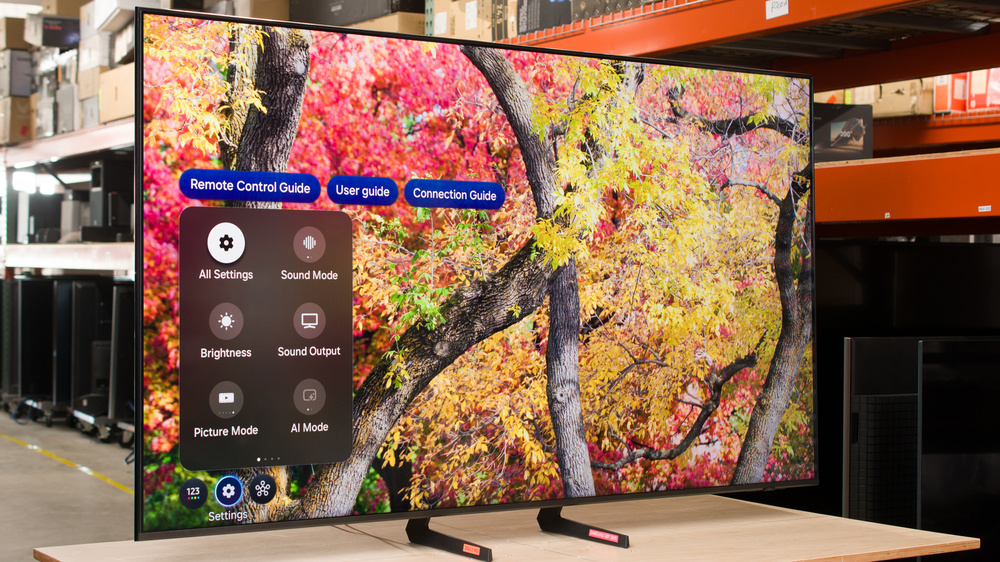
The Samsung Q8F 2025 is an entry-level 4k TV released in 2025 as part of Samsung's QLED lineup, sitting above the Samsung Q7F 2025. It boasts a surprisingly comprehensive selection of features, particularly for gamers, including a high 144Hz refresh rate, VRR support, and HDMI 2.1 bandwidth on all four inputs. It completely lacks advanced picture quality features like local dimming. The TV supports HDR10+, passes through most Dolby audio formats, and features built-in 20W 2.0-channel speakers. It runs Samsung's proprietary Tizen OS, which is loaded with streaming apps, and it has Samsung's TV Plus and Multi-View, supports Apple AirPlay, and offers voice control. We bought and tested the 65-inch model, but it's also available in 32, 43, 50, 55, 75, and 85-inch models.
Our Verdict
The Samsung Q8F is a mediocre TV overall. It's best suited for watching shows or movies in SDR in a moderately lit room, or for single-player games. It offers a great selection of features, especially for gaming, but has limited picture quality in all modes. It doesn't look good in a dark room due to its poor black levels, and it struggles to handle direct light, making it a poor choice for a bright room. It also struggles to handle fast motion due to its very slow response time.
Accurate colors out of the box.
Good upscaling.
Low contrast and no local dimming.
Not bright enough in SDR to overcome glare in a bright room.
Blurry motion, especially in dark scenes.
Can't reduce the intensity of direct, mirror-like reflections.
The Samsung Q8F is a disappointing TV for home theater use under reference conditions. It doesn't look good in a dark room due to its low contrast and lack of a local dimming feature, resulting in poor black levels overall. It's not bright enough to bring out bright specular highlights in HDR, colors are dull and muted, and HDR in general adds very little. It has good processing, though, with great EOTF tracking and good gradient handling. Thanks to its slower response time, stutter is kept to a minimum, but slow panning shots still don't look quite as smooth as intended. Unfortunately, it doesn't support Dolby Vision HDR or DTS audio formats.
Great PQ EOTF tracking.
Removes judder from almost all sources.
Low contrast and no local dimming.
Bright specular highlights don't stand out at all, and bright scenes are dull and flat.
Can't display a wide range of colors in HDR.
Doesn't support Dolby Vision HDR or DTS audio formats.
The Samsung Q8F is a mediocre choice for a bright room. The glossy panel does very little to reduce the intensity of direct reflections, so light from open windows is distracting, and it can't get bright enough to overcome them. On the other hand, ambient light has very little impact on contrast or perceived color volume.
Ambient light has no impact on black levels.
Not bright enough in SDR to overcome glare in a bright room.
Can't reduce the intensity of direct, mirror-like reflections.
The Samsung Q8F is mediocre for watching sports. It has good upscaling and can remove artifacts from some low-quality streams, but there's some loss of fine details. Unfortunately, it has a slow pixel response time, resulting in significant blur around fast action, and exhibits poor uniformity with a noticeable dirty screen effect in the center of the screen. There are also some unintended intermediate colors around the edges of fast-moving players and objects. Finally, it's a mediocre choice for afternoon games as it doesn't look good in a bright room due to its low peak brightness and limited reflection handling.
Good upscaling.
Not bright enough in SDR to overcome glare in a bright room.
Blurry motion, especially in dark scenes.
Can't reduce the intensity of direct, mirror-like reflections.
Fast-paced scenes and sports have visible color artifacts.
The Samsung Q8F is an acceptable TV for gaming. It has a great selection of gaming features, including HDMI 2.1 bandwidth, VRR support, and a high maximum refresh rate. It has incredibly low input lag with all supported formats. Samsung's built-in Game Bar also makes it very easy to adjust your picture quality while gaming, and it has some neat gaming features that are typically only found on gaming monitors, like a virtual aim point and a minimap zoom feature. On the other hand, this TV has a very slow response time, so fast motion is blurry and hard to make out, making it unsuitable for competitive multiplayer gaming. It also has poor picture quality, with low contrast and low peak brightness in Game Mode, so bright highlights in games don't stand out.
Incredibly low input lag.
HDMI 2.1 bandwidth, up to 4k @ 144Hz, and VRR support.
Not bright enough in SDR to overcome glare in a bright room.
Blurry motion, especially in dark scenes.
The Samsung Q8F has poor peak brightness. It gets acceptably bright in SDR, so it can handle some glare in a bright room, but it's best-suited for a moderately-lit room. It's peak brightness is too low in HDR, though, so bright specular highlights don't stand out at all and bright scenes are flat and dull.
Not bright enough in SDR to overcome glare in a bright room.
Bright specular highlights don't stand out at all, and bright scenes are dull and flat.
The Samsung Q8F has poor black levels. Although it has good black uniformity, it has low contrast and no local dimming, so blacks are uniformly raised across the screen in all content. There's a global dimming feature that helps reduce black levels in extremely dark scenes, but it only works in SDR and can't be adjusted.
Low contrast and no local dimming.
The Samsung Q8F has okay colors. It offers great accuracy in both SDR and HDR out of the box, and it calibrates well in SDR if you're concerned about achieving the most accurate image. It has mediocre color volume in all color spaces, though, as it can't display a wide color gamut, and bright colors are limited by its low peak brightness.
Accurate colors out of the box.
Can't display a wide range of colors in HDR.
The Samsung Q8F has decent motion handling when watching different types of content. The TV is completely free from judder and micro-judder, with the exception of 25p content sent via a 60p signal, so you only see jittery motion if you're watching some European content from an older device. Its response time is on the slower side, so fast-paced scenes and sports look blurry. Furthermore, there are color artifacts around the edges of objects and people in fast-paced scenes and sports, which also affects the clarity of motion. However, there's not very much stutter in shots with slower camera movements due to its slower response time.
Removes judder from almost all sources.
No micro-judder from most sources.
Blurry motion, especially in dark scenes.
Fast-paced scenes and sports have visible color artifacts.
The Samsung Q8F is a decently responsive TV when gaming. It has a high maximum refresh rate, great format support, VRR, and incredibly low input lag, especially at higher refresh rates, all of which contribute to a responsive feel. On the other hand, it has poor motion handling at all refresh rates, so fast action in games is blurry most of the time, and dark scenes are especially bad.
Incredibly low input lag.
HDMI 2.1 bandwidth, up to 4k @ 144Hz, and VRR support.
Blurry motion, especially in dark scenes.
Note: We're in the process of improving our tests related to image processing, but this score should give you a general idea of how a TV performs overall with its image processing capabilities.
The Samsung Q8F has good processing capabilities. It has good upscaling and good gradient handling in HDR, with just a bit of banding in shades of green. It also features excellent EOTF tracking, but this is limited by its low peak brightness and raised blacks. On the other hand, it has just okay low-quality content smoothing. It can smooth out macroblocking and pixelization to some extent, but doing so results in a noticeable loss of fine details.
Great PQ EOTF tracking.
Good gradient handling.
Performance Usages
Changelog
-
Updated Mar 12, 2026:
We added text to our new Cinematic Motion Handling performance usage and our new Transition Artifacts and Stutter Reduction Via Interpolation test sections after converting the review to TV 2.2.
- Updated Mar 10, 2026: This review has been updated to TV 2.2. We've added new sections for Transition Artifacts and Stutter Reduction Via Interpolation, and updated the way we test Stutter. Additionally, we removed the 'Broken' disclaimer from our Motion Handling usage.
- Updated Feb 05, 2026: We added text to the new Micro-Judder section and refreshed the text in the updated Judder and Response Time Stutter sections after converting the review to TV 2.1.
-
Updated Dec 05, 2025:
Mentioned the newly reviewed Roku Pro Series 2025 in the HDR Brightness section.
Check Price
Differences Between Sizes And Variants
We've purchased and tested the 65-inch Samsung Q8F 2025, and these results are also applicable to the 55, 75, and 85-inch sizes. The 32, 43, and 50-inch models differ slightly, as they don't support the enhanced gaming features found on the other sizes. They have only three HDMI inputs and are limited to a 60Hz refresh rate. Note that with Samsung TVs, the four letters after the short model code (FXZA in this case) vary between different retailers and regions, but there's no difference in performance.
Various warehouse stores, such as Costco and Sam's Club, sell a variant of this TV known as the Samsung Q8FD. It performs the same but comes with an extended warranty.
| Size | US Model | Costco & Sam's Club Model (US) | Max Refresh Rate | HDMI Ports |
| 32" | QN32Q8FAAFXZA | - | 60Hz | 3 |
| 43" | QN43Q8FAAFXZA | - | 60Hz | 3 |
| 50" | QN50Q8FAAFXZA | - | 60Hz | 3 |
| 55" | QN55Q8FAAFXZA | QN55Q8FDAFXZA | 144Hz | 4 |
| 65" | QN65Q8FAAFXZA | QN65Q8FDAFXZA | 144Hz | 4 |
| 75" | QN75Q8FAAFXZA | QN75Q8FDAFXZA | 144Hz | 4 |
| 85" | QN85Q8FAAFXZA | - | 144Hz | 4 |
Our unit was made in Mexico in April 2025.
Popular TV Comparisons
The Samsung Q8F 2025 is a bit of a strange TV. It's incredibly feature-packed, with HDMI 2.1 bandwidth, a high refresh rate, and VRR support. On the other hand, it has very few picture-enhancing features, with no local dimming, a limited color gamut, and low peak brightness. This puts it in a similar market position to TVs like the TCL Q77K and Hisense QD7N, but it's also considerably more expensive than those two. It targets gamers who care more about gaming features than overall picture quality, but it fails at that mission as its slow response time makes it unsuitable for competitive gaming. While it's nice to see advanced gaming features making their way down to more affordable models, there are better options available from other brands that deliver decent picture quality and gaming features simultaneously, such as the TCL QM6K or the Hisense U65QF.
For more options, check out our recommendations for the best TVs under $1,000, the best TVs for gaming, or the best 4k TVs.
The Samsung Q8F 2025 is a noticeable step up from the Samsung Q7F 2025. The Q8F is much more feature-packed, with VRR support, a high refresh rate, and HDMI 2.1 bandwidth on all four inputs. Outside of these extra features, though, there's not much difference, and they deliver similar overall picture quality.
The Samsung QN70F is much better than the Samsung Q8F 2025. The QN70F is a lot brighter, so it can handle more glare when used in a bright room, and HDR content is more vivid and lifelike. Other than brightness, these two TVs are very similar overall, with a similar range of gaming and smart features.
The TCL QM6K is much better than the Samsung Q8F 2025. The TCL delivers much better picture quality, with higher peak brightness and better contrast thanks to its Mini LED local dimming feature. They have similar gaming features, but the TCL supports a boosted 288Hz refresh rate with lower resolution signals, great for PC gamers.
The Samsung QN80F is a considerable step up over the entry-level, but similarly-named Samsung Q8F 2025. The QN80F has a full array local dimming feature, making it a much better choice for a dark room, as blacks are considerably deeper. The QN80F also gets much brighter, so it can overcome more glare in a bright room, and HDR content is more vivid and lifelike.

We buy and test dozens of TVs yearly, taking an objective, data-driven approach to deliver results you can trust. Our testing process is complex, with hundreds of individual tests that take over a week to complete. Most of our tests use specially designed test patterns that mimic real content, but we also use the same sources you have at home to ensure our results match the real-world experience. We use two main tools for our testing: a Colorimetry Research CR-100 colorimeter and a CR-250 spectroradiometer.
Test Results
for pictures & test results

for pictures & test results

for pictures & test results

The Samsung Q8F has bad peak brightness in HDR. It's not bright enough to bring out specular highlights, and fine details are lost in large, bright areas. You can get superior HDR brightness from TVs such as the Roku Pro Series 2025.
These measurements are in the Filmmaker Mode with 'HDR Tone Mapping' set to 'Static'. Below are the results with 'HDR Tone Mapping' set to 'Active'.
- Hallway Lights: 312 cd/m²
- Yellow Skyscraper: 254 cd/m²
- Landscape Pool: 126 cd/m²
for pictures & test results

for pictures & test results

for pictures & test results

Switching to Game Mode very slightly increases the peak brightness of some scenes, but it's not a noticeable difference. It's still far too dark to deliver an impactful HDR gaming experience.
Results with 'HDR Tone Mapping' set to 'Active':
- Hallway Lights: 322 cd/m²
- Yellow Skyscraper: 252 cd/m²
- Landscape Pool: 120 cd/m²
The Samsung Q8F QLED has mediocre peak brightness in SDR. It can get bright enough to overcome a bit of glare in a bright room, but not if you have a lot of open windows or bright lights directly opposite the TV.
Very small highlights in very dark scenes in SDR are dimmed by the TV's global dimming feature. It doesn't do this in HDR, but this feature can't be disabled in SDR.
for pictures & test results

The native contrast is poor. There's no local dimming feature, so blacks are raised whenever bright highlights are visible in the scene. It does have global dimming in SDR, though, which helps reduce black levels in easier scenes.
for pictures & test results

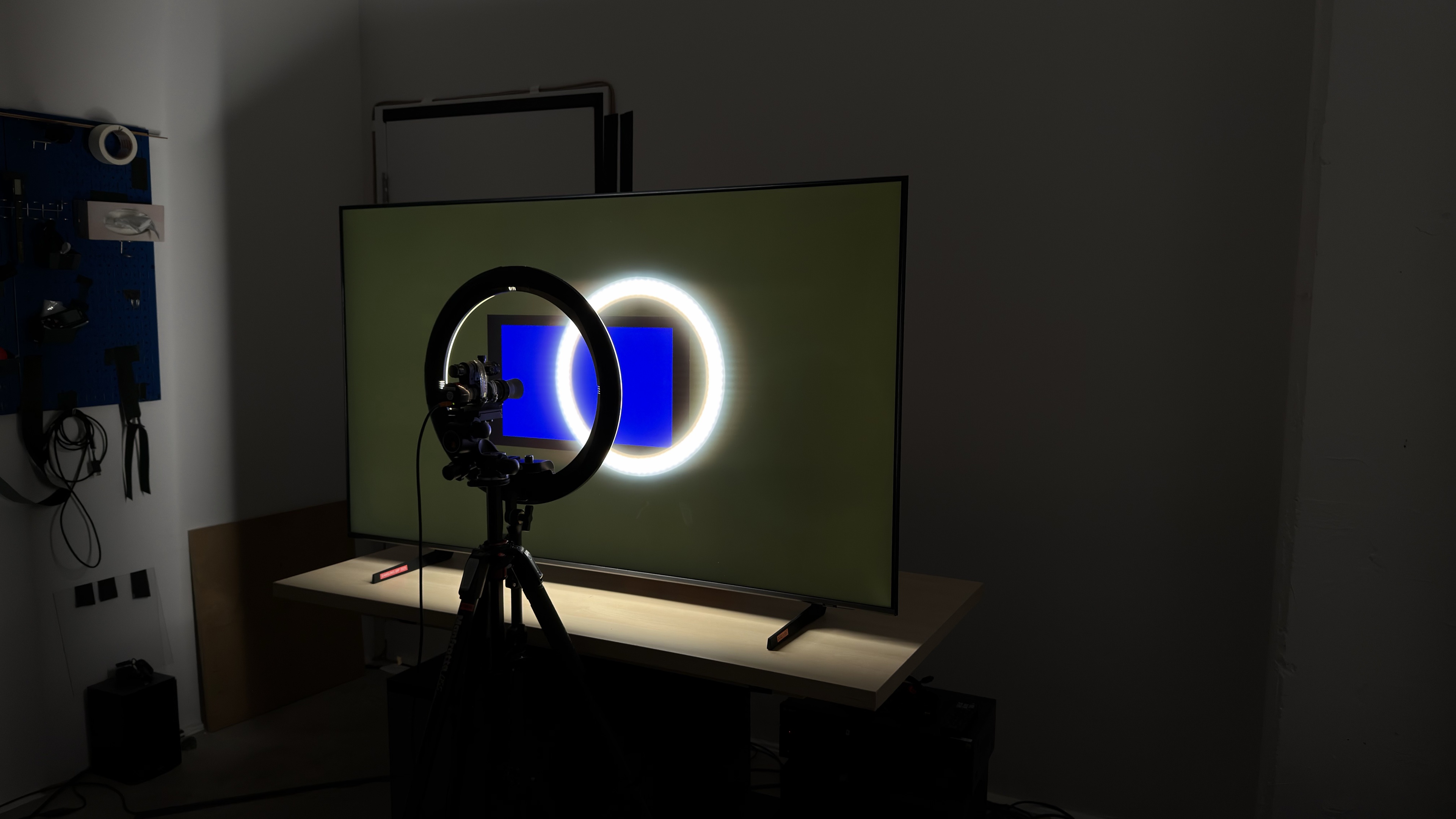
There's no local dimming feature, so there are no lighting zones. This means there's no haloing around bright elements against a dark background or subtitles, but the entire image looks gray and washed out.
for videos & test results

This TV doesn't have a local dimming feature, so it can't adjust the backlight of individual zones to brighten up highlights without impacting the rest of the image. This means that there are no distracting flickers or brightness changes as bright highlights move between dimming zones.



for pictures & test results

The black uniformity on this TV is good. There are a few brighter patches across the screen, but they're not too noticeable.
for pictures & test results

for pictures & test results

The Samsung Q8F has passable color volume in SDR. it struggles to display saturated greens and reds at all lightness levels. There's also a noticeable decrease in saturation of all colors at higher lightness levels.
| Volume ΔE³ | DCI-P3 Coverage |
BT.2020 Coverage |
|---|---|---|
| L10 | 88.91% | 65.28% |
| L20 | 89.39% | 64.26% |
| L30 | 88.51% | 63.40% |
| L40 | 86.14% | 62.57% |
| L50 | 84.50% | 61.73% |
| L60 | 81.32% | 58.48% |
| L70 | 75.52% | 48.73% |
| L80 | 75.06% | 46.30% |
| L90 | 74.65% | 45.91% |
| L100 | 80.02% | 55.69% |
| Total | 80.50% | 54.79% |
for pictures & test results

for pictures & test results

The HDR color volume is mediocre. It struggles to display saturated colors in low-luminance scenes, and colors aren't very bright or vibrant in bright scenes.
for pictures & test results

for pictures & test results

for pictures & test results

The Samsung Q8F has great accuracy in SDR out of the box. Dark scenes look the worst overall, as gamma is too high and shadow details are crushed. There's not enough blue in brighter scenes, giving the TV a slightly warm color temperature overall.
for pictures & test results

for pictures & test results

for pictures & test results

This TV is fairly easy to calibrate in moderate and bright scenes, but darker scenes are still a bit off, and shadows are crushed even after calibration. On the other hand, the overall white balance is fantastic, colors look great, and the color temperature is nearly perfect.
See our full calibration settings.
for pictures & test results

for pictures & test results

This TV has great accuracy in HDR before calibration. The white balance is a bit off in brighter shades, and there are noticeable color mapping errors across the board, but it's not too bad. The color temperature is excellent.
for pictures & test results

for pictures & test results

This TV doesn't calibrate very well in HDR. A full calibration improves color accuracy and the white balance a bit, but most of the more noticeable issues are still there.
for pictures & test results

The Samsung Q8F has great PQ EOTF tracking. The biggest issue is near blacks, which are slightly raised due to the TV's low contrast and lack of local dimming. Darker tones are displayed well, but the TV crushes midtones a bit and it starts rolling off very early. This helps maintain fine gradation in bright parts of the scene, but limits how bright that content gets.
for pictures & test results

The low-quality content smoothing on this TV is just okay. It's a lot better than the Samsung Q7F 2025, and it smooths out macroblocking and pixelization a bit, but there's a noticeable loss of fine details that gives it a slightly waxy look.
for pictures & test results

The upscaling on this TV is good overall. Fine details are preserved well, but text is still a bit hard to make out.
for pictures & test results

The gradient handling on this TV is good. There's some noticeable banding in all shades of green, but it's not terrible, and everything else looks great.
The Samsung Q8F 2025 has excellent input lag, which helps deliver a more responsive gaming experience. Unlike most TVs, the input lag is relatively low even outside of the dedicated Game Mode, so if you want to enable a few of the extra processing modes, you can do so without significantly increasing the latency.
The TV supports all common resolutions up to 4k @ 144Hz on all four HDMI inputs.
This TV supports VRR with a wide refresh rate range, ensuring the image remains nearly tear-free even when the frame rate drops in challenging scenes.
for pictures & test results
for pictures & test results

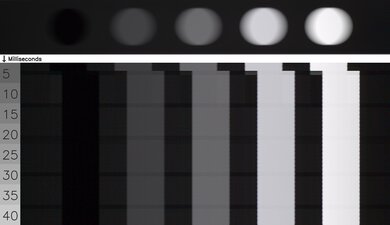
This TV has a poor response time at the maximum refresh rate. Transitions are extremely sluggish, especially in or out of dark shades, resulting in significant motion blur. There's very little overshoot, though, which limits the amount of inverse ghosting you'll see.


for pictures & test results

The Samsung Q8F TV is fully compatible with everything the PS5 offers, like 1440p @ 120Hz and 4k @ 120Hz, as well as HDMI Forum VRR. It also supports Auto Low Latency Mode, so you don't have to worry about manually switching to Game Mode to get the lowest input lag.
for pictures & test results

The TV is compatible with almost everything the Xbox Series X|S offers, including 1440p @ 120Hz, 4k @ 120Hz, HDMI Forum VRR, and FreeSync Premium Pro. It also supports Auto Low Latency Mode, so you don't have to worry about manually switching to Game Mode to get the lowest input lag. Unfortunately, it doesn't support Dolby Vision.
for videos & test results
for pictures & test results

for pictures & test results
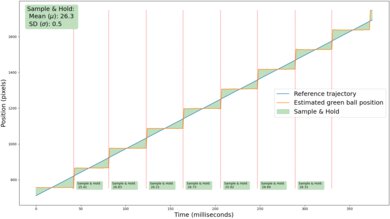
Thanks to the TV's relatively slow response time, there's only some subtle stutter in shots with slower camera movements. However, not everyone will be bothered by it.
for videos & test results
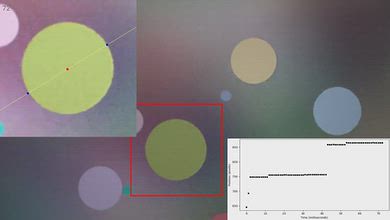
for pictures & test results

for pictures & test results
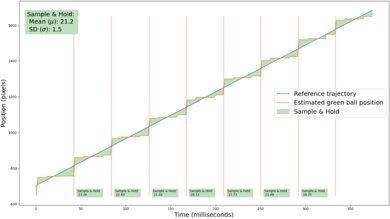
The TV does a reasonable job of reducing stutter in 24 fps content with the motion interpolation setting that's equivalent to 30 fps. The hold time of frames is reduced, and the feature has good consistency, so motion is smoother and looks even.
for pictures & test results
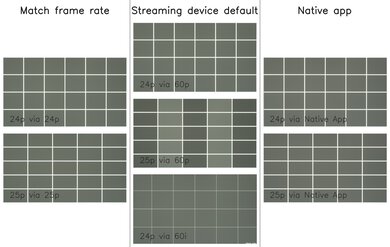
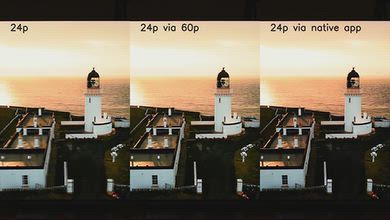
This TV automatically removes judder from all sources, except when watching 25p content via a 60p signal, so motion only looks jittery if you're watching certain European content from an older streaming device.
for videos & test results
for videos & test results
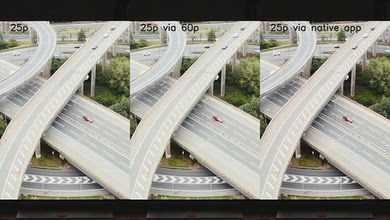
The Samsung Q8F 2025 only has micro-judder present in scenes with complex motion when watching 25p content via a 60p signal, like when using an older streaming device that doesn't have a feature to match the outputted signal to the frame rate of the content.
for pictures & test results

for pictures & test results

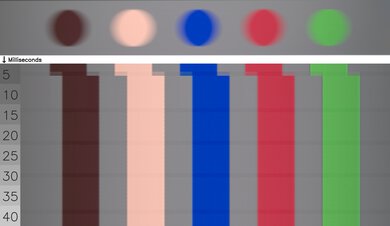
The Samsung Q8F has a mediocre cinematic response time. Most transitions are very slow, causing more noticeable motion blur around fast-moving objects.
for pictures & test results
for pictures & test results
The Samsung Q8F 2025 does a decent job of avoiding transition artifacts overall. There are no edge artifacts at all, so the edges of fast-moving objects and people are just as clear as the center. However, there are visible intermediate colors present. For example, there's a hint of yellow around blues, which affects color consistency in fast-paced scenes and sports.
for pictures & test results

The Samsung Q8F 2025 uses pulse-width modulation (PWM) to dim its backlight, which introduces flicker that can bother people who are sensitive to it. The amount of flicker varies depending on what picture mode it's set to, but unlike most other Samsung TVs the brightness doesn't impact the flicker frequency.
- Movie: 960Hz
- Filmmaker: 120Hz
- Dynamic: 120Hz
- Standard: 120Hz
- PC Mode: 120Hz in both 'Entertain' and 'Graphics'
- Game Mode: 120Hz
for pictures & test results

for pictures & test results

This TV supports backlight strobing, more commonly known as black frame insertion (BFI). The feature is designed to improve the appearance of motion by strobing its backlight and reducing the amount of persistence blur. The pulse timing on this model is much better than usual, and there's almost no noticeable image duplication.


for pictures & test results

for pictures & test results

Unfortunately, the total amount of reflected light off the screen is disappointing. Bright lights are distracting, and although there's very little rainbow smear, there are diffraction artifacts.
for pictures & test results

The perceived color saturation in a bright room is okay. Ambient light reduces color saturation a bit, but it's not too bad.
for videos & test results

for pictures & test results

for pictures & test results

for pictures & test results

The Samsung Q8F has a mediocre viewing angle. There's very little noticeable hue shift, but brightness drops off quickly as you move off-center, so the TV looks very dark very quickly. This makes it a poor choice for a wide seating arrangement.
for pictures & test results

for pictures & test results

The gray uniformity of this TV is poor. There are dark vertical bands running across the screen which are most likely caused by the LEDs running along the edge of the TV. There's also noticeable dirty screen effect in the center and considerable vignetting.
for pictures & test results

for pictures & test results

This TV uses a BGR subpixel layout. It doesn't affect picture quality but can cause issues with text clarity in some applications when using it as a PC monitor. The spectral power distribution shows good separation of colors, but the green and red peaks are very shallow, suggesting that the TV either makes limited use of or has low-quality quantum dot color converters.
for pictures & test results

for pictures & test results

This TV has a good selection of ports. All four HDMI inputs support HDMI 2.1 bandwidth up to 48Gbps, which is uncommon for this price point. It doesn't have ATSC 3.0, though, so you're limited to 1080p for OTA broadcasts.
This TV supports most Dolby Digital audio formats. However, like other 2025 Samsung models, it doesn't passthrough Dolby Digital Plus 7.1. Unfortunately, it also doesn't support DTS formats, which is disappointing, as many Blu-rays use DTS for their lossless audio tracks.
for pictures & test results

The Samsung 65Q8F has a more premium design than the lower-end Samsung Q7F thanks to its edge-lit backlight system. It's thin, with very thin bezels on all four sides.
for pictures & test results

The TV uses a pair of plastic feet that can be installed in either a narrow or a wide position depending on the size of your table.
The footprint of the 65-inch stand is 11.8" x 10.7" in the narrow position and 41" x 10.7" in the wide position. Both settings lift the TV about 3.1" above the table, so most soundbars fit in front of the TV without blocking the screen.
for pictures & test results

The back of the TV is made from plastic. All of the inputs are on the right side of the TV when facing the front, but they're in a recessed cutout that makes them quite hard to access if you have it wall-mounted. The back has grooves and a clip that can be attached to one of the feet to help with cable management.


for pictures & test results

The Samsung Q8F 2025 has good build quality. The stand isn't great as the TV wobbles easily, but it recovers quickly. It's mostly made of plastic, but there are no obvious issues with its construction. Note that edge-lit TVs like this one break faster under prolonged use.
for pictures & test results

The Samsung Q8F Series comes with the 2025 version of Samsung's proprietary Tizen OS.
for pictures & test results

Like most TVs, there are ads on the home screen. You can't disable them completely, although you can turn off targeted ads.
for pictures & test results

The remote has a rechargeable battery that can be charged via USB-C or solar power, and the voice control gives you access to Bixby and Alexa.


for pictures & test results

- Remote control
- Power cable
- Clip for cable management
- User guides
for pictures & test results

The Samsung Q8F 2025 has an okay frequency response. Its well-balanced, so dialogue is clear and easy to understand, but it doesn't get very loud and there's little deep bass.